> ## Documentation Index
> Fetch the complete documentation index at: https://wb-21fd5541-feat-cli-docs-generator.mintlify.site/llms.txt
> Use this file to discover all available pages before exploring further.
# Reports
> 기계 학습 프로젝트를 위한 프로젝트 관리 및 협업 툴
W\&B Reports를 사용하여 다음을 수행할 수 있습니다.
* Runs를 정리합니다.
* 시각화 자료를 포함하고 자동화합니다.
* 발견한 내용을 설명합니다.
* 공동 작업자와 업데이트를 LaTeX zip 파일 또는 PDF로 공유합니다.
다음 이미지는 트레이닝 과정에서 W\&B에 기록된 메트릭에서 생성된 리포트의 섹션을 보여줍니다.
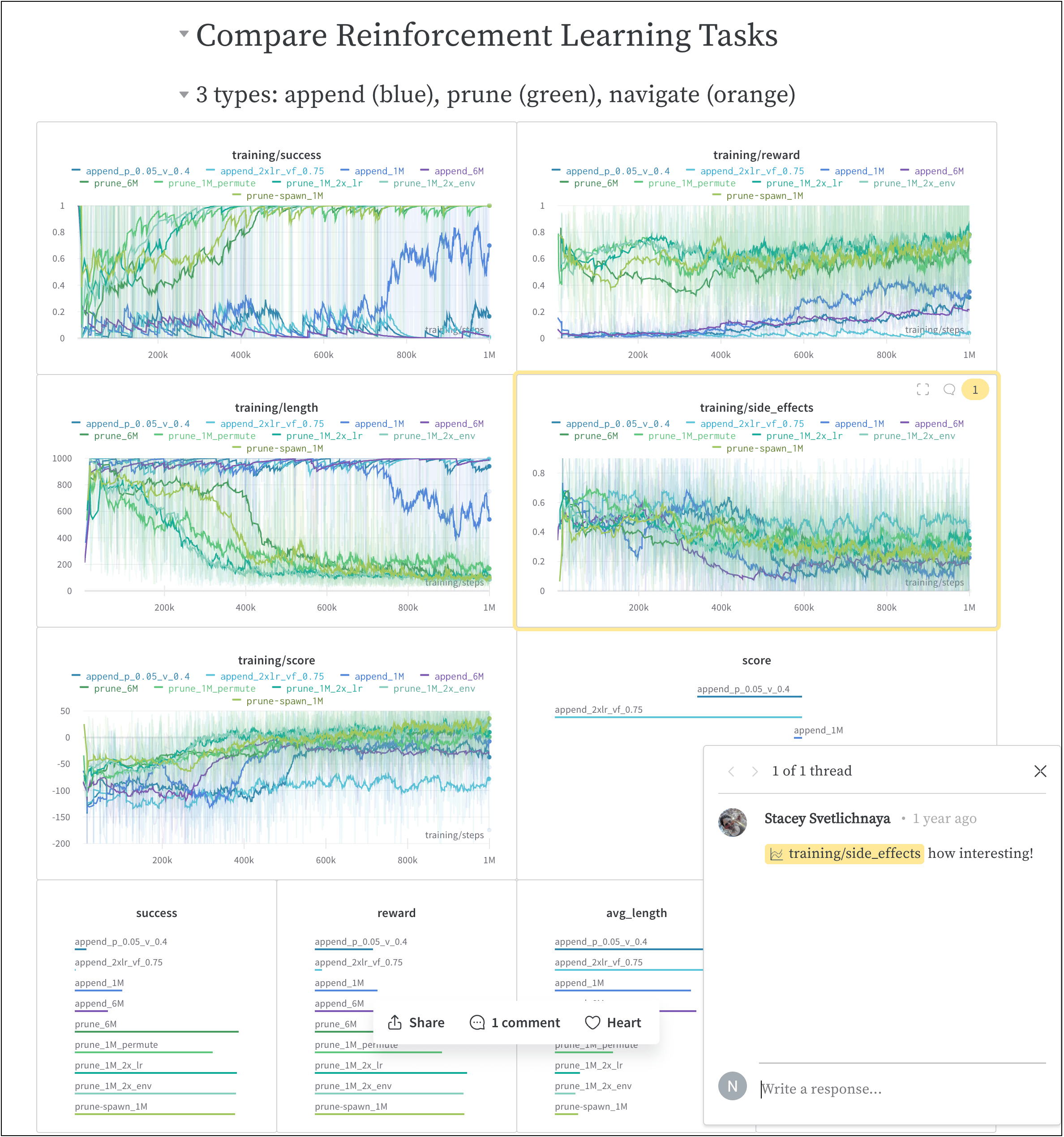 위 이미지가 가져온 리포트는 [여기](https://wandb.ai/stacey/saferlife/reports/SafeLife-Benchmark-Experiments--Vmlldzo0NjE4MzM)에서 볼 수 있습니다.
## 작동 방식
몇 번의 클릭으로 협업 리포트를 만듭니다.
1. W\&B App에서 W\&B project 워크스페이스로 이동합니다.
2. 워크스페이스의 오른쪽 상단 모서리에 있는 **리포트 만들기** 버튼을 클릭합니다.
위 이미지가 가져온 리포트는 [여기](https://wandb.ai/stacey/saferlife/reports/SafeLife-Benchmark-Experiments--Vmlldzo0NjE4MzM)에서 볼 수 있습니다.
## 작동 방식
몇 번의 클릭으로 협업 리포트를 만듭니다.
1. W\&B App에서 W\&B project 워크스페이스로 이동합니다.
2. 워크스페이스의 오른쪽 상단 모서리에 있는 **리포트 만들기** 버튼을 클릭합니다.
 3. **리포트 만들기**라는 모달이 나타납니다. 리포트에 추가할 차트와 패널을 선택합니다. (차트와 패널은 나중에 추가하거나 제거할 수 있습니다.)
4. **리포트 만들기**를 클릭합니다.
5. 원하는 상태로 리포트를 편집합니다.
6. **프로젝트에 게시**를 클릭합니다.
7. **공유** 버튼을 클릭하여 공동 작업자와 리포트를 공유합니다.
W\&B Python SDK를 사용하여 대화형 및 프로그래밍 방식으로 리포트를 만드는 방법에 대한 자세한 내용은 [리포트 만들기](/ko/models/reports/create-a-report/) 페이지를 참조하세요.
## 시작 방법
유스 케이스에 따라 다음 리소스를 탐색하여 W\&B Reports를 시작하세요.
* W\&B Reports에 대한 개요를 보려면 [비디오 데모](https://www.youtube.com/watch?v=2xeJIv_K_eI)를 확인하세요.
* 라이브 리포트의 예는 [Reports 갤러리](/ko/models/reports/reports-gallery/)를 탐색해 보세요.
* [프로그래밍 방식 워크스페이스](/ko/tutorials/workspaces) 튜토리얼을 통해 워크스페이스를 만들고 사용자 정의하는 방법을 알아보세요.
* [W\&B Fully Connected](http://wandb.me/fc)에서 큐레이트된 Reports를 읽어보세요.
## 권장 모범 사례 및 팁
Experiments 및 로깅에 대한 모범 사례 및 팁은 [모범 사례: Reports](https://wandb.ai/wandb/pytorch-lightning-e2e/reports/W-B-Best-Practices-Guide--VmlldzozNTU1ODY1#reports)를 참조하세요.
3. **리포트 만들기**라는 모달이 나타납니다. 리포트에 추가할 차트와 패널을 선택합니다. (차트와 패널은 나중에 추가하거나 제거할 수 있습니다.)
4. **리포트 만들기**를 클릭합니다.
5. 원하는 상태로 리포트를 편집합니다.
6. **프로젝트에 게시**를 클릭합니다.
7. **공유** 버튼을 클릭하여 공동 작업자와 리포트를 공유합니다.
W\&B Python SDK를 사용하여 대화형 및 프로그래밍 방식으로 리포트를 만드는 방법에 대한 자세한 내용은 [리포트 만들기](/ko/models/reports/create-a-report/) 페이지를 참조하세요.
## 시작 방법
유스 케이스에 따라 다음 리소스를 탐색하여 W\&B Reports를 시작하세요.
* W\&B Reports에 대한 개요를 보려면 [비디오 데모](https://www.youtube.com/watch?v=2xeJIv_K_eI)를 확인하세요.
* 라이브 리포트의 예는 [Reports 갤러리](/ko/models/reports/reports-gallery/)를 탐색해 보세요.
* [프로그래밍 방식 워크스페이스](/ko/tutorials/workspaces) 튜토리얼을 통해 워크스페이스를 만들고 사용자 정의하는 방법을 알아보세요.
* [W\&B Fully Connected](http://wandb.me/fc)에서 큐레이트된 Reports를 읽어보세요.
## 권장 모범 사례 및 팁
Experiments 및 로깅에 대한 모범 사례 및 팁은 [모범 사례: Reports](https://wandb.ai/wandb/pytorch-lightning-e2e/reports/W-B-Best-Practices-Guide--VmlldzozNTU1ODY1#reports)를 참조하세요.