> ## Documentation Index
> Fetch the complete documentation index at: https://wb-21fd5541-feat-cli-docs-generator.mintlify.site/llms.txt
> Use this file to discover all available pages before exploring further.
# Experiments
> W&B로 기계 학습 실험을 추적하세요.
몇 줄의 코드로 기계 학습 Experiments 를 추적하세요. 그런 다음 [대화형 대시보드](/ko/models/track/workspaces/)에서 결과를 검토하거나, [Public API](/ko/models/ref/python/public-api/)를 사용하여 프로그래밍 방식으로 엑세스할 수 있도록 데이터를 Python으로 내보낼 수 있습니다.
[PyTorch](/ko/guides/integrations/pytorch), [Keras](/ko/guides/integrations/keras), 또는 [Scikit](/ko/guides/integrations/scikit)과 같은 널리 사용되는 프레임워크를 사용하는 경우 W\&B Integrations 를 활용하세요. W\&B 를 코드에 추가하는 방법에 대한 정보 및 전체 인테그레이션 목록은 [Integration 가이드](/ko/guides/integrations/)를 참조하세요.
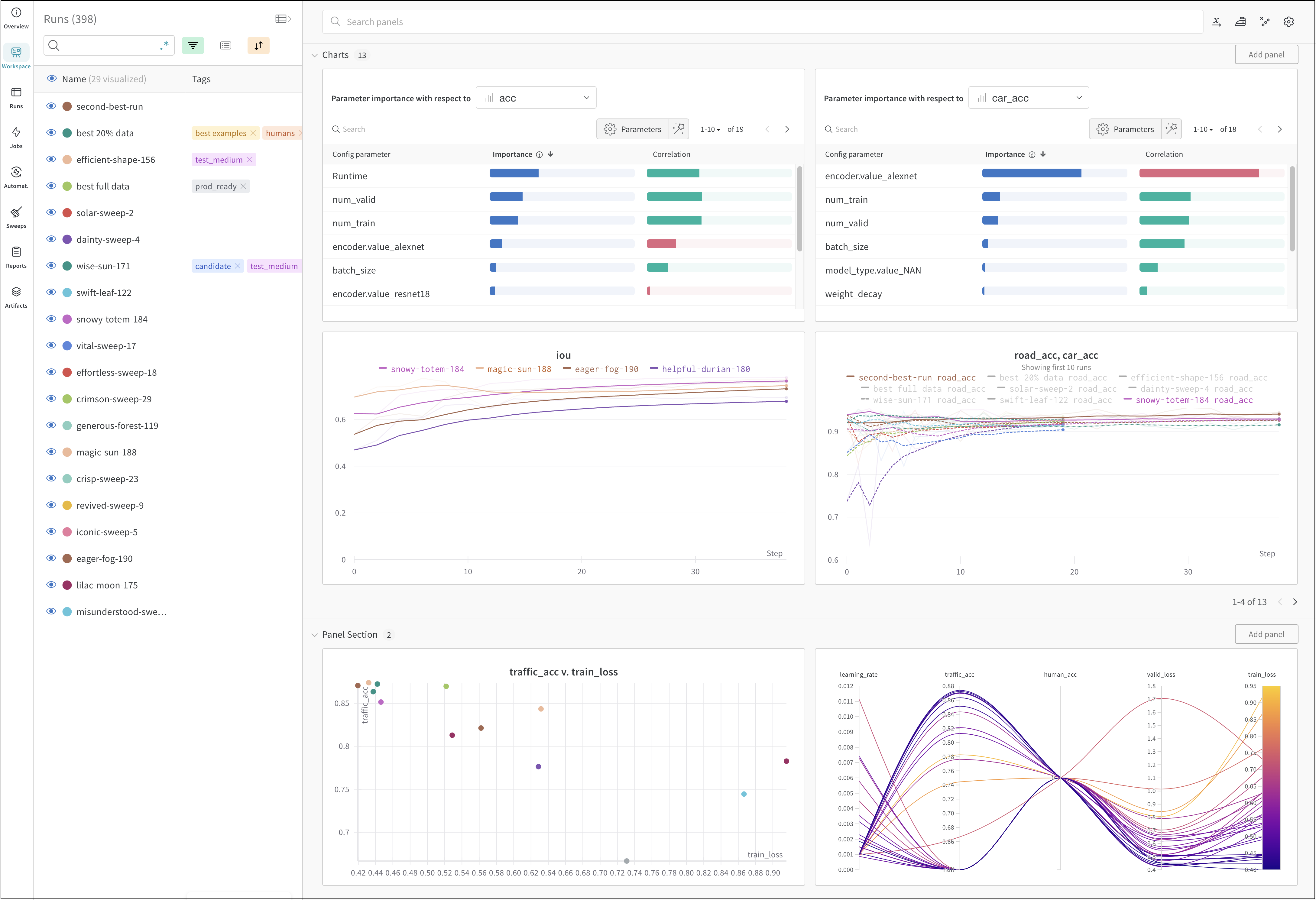 위의 이미지는 여러 [runs](/ko/models/runs/)에서 메트릭을 보고 비교할 수 있는 대시보드 의 예시를 보여줍니다.
## 작동 방식
몇 줄의 코드로 기계 학습 experiment 를 추적합니다.
1. [W\&B run](/ko/models/runs/)을 만듭니다.
2. 학습률 또는 모델 유형과 같은 하이퍼파라미터 사전을 구성 ([`run.config`](/ko/models/track/config/))에 저장합니다.
3. 정확도 및 손실과 같은 트레이닝 루프에서 시간 경과에 따른 메트릭 ([`run.log()`](/ko/models/track/log/))을 기록합니다.
4. 모델 weights 또는 예측 테이블과 같은 run 의 출력을 저장합니다.
다음 코드는 일반적인 W\&B experiment 추적 워크플로우를 보여줍니다.
```python theme={null}
# Start a run.
#
# When this block exits, it waits for logged data to finish uploading.
# If an exception is raised, the run is marked failed.
with wandb.init(entity="", project="my-project-name") as run:
# Save mode inputs and hyperparameters.
run.config.learning_rate = 0.01
# Run your experiment code.
for epoch in range(num_epochs):
# Do some training...
# Log metrics over time to visualize model performance.
run.log({"loss": loss})
# Upload model outputs as artifacts.
run.log_artifact(model)
```
## 시작하기
유스 케이스에 따라 다음 리소스를 탐색하여 W\&B Experiments 를 시작하세요.
* 데이터셋 artifact 를 생성, 추적 및 사용하는 데 사용할 수 있는 W\&B Python SDK 코맨드에 대한 단계별 개요는 [W\&B 퀵스타트](/ko/models/quickstart/)를 참조하세요.
* 다음 방법을 배우려면 이 챕터를 살펴보세요.
* experiment 생성
* Experiments 구성
* Experiments 에서 데이터 기록
* Experiments 결과 보기
* [W\&B API Reference Guide](/ko/models/ref/) 내에서 [W\&B Python Library](/ko/models/ref/python/)를 탐색합니다.
## 모범 사례 및 팁
Experiments 및 로깅에 대한 모범 사례 및 팁은 [Best Practices: Experiments and Logging](https://wandb.ai/wandb/pytorch-lightning-e2e/reports/W-B-Best-Practices-Guide--VmlldzozNTU1ODY1#w\&b-experiments-and-logging) 를 참조하세요.
위의 이미지는 여러 [runs](/ko/models/runs/)에서 메트릭을 보고 비교할 수 있는 대시보드 의 예시를 보여줍니다.
## 작동 방식
몇 줄의 코드로 기계 학습 experiment 를 추적합니다.
1. [W\&B run](/ko/models/runs/)을 만듭니다.
2. 학습률 또는 모델 유형과 같은 하이퍼파라미터 사전을 구성 ([`run.config`](/ko/models/track/config/))에 저장합니다.
3. 정확도 및 손실과 같은 트레이닝 루프에서 시간 경과에 따른 메트릭 ([`run.log()`](/ko/models/track/log/))을 기록합니다.
4. 모델 weights 또는 예측 테이블과 같은 run 의 출력을 저장합니다.
다음 코드는 일반적인 W\&B experiment 추적 워크플로우를 보여줍니다.
```python theme={null}
# Start a run.
#
# When this block exits, it waits for logged data to finish uploading.
# If an exception is raised, the run is marked failed.
with wandb.init(entity="", project="my-project-name") as run:
# Save mode inputs and hyperparameters.
run.config.learning_rate = 0.01
# Run your experiment code.
for epoch in range(num_epochs):
# Do some training...
# Log metrics over time to visualize model performance.
run.log({"loss": loss})
# Upload model outputs as artifacts.
run.log_artifact(model)
```
## 시작하기
유스 케이스에 따라 다음 리소스를 탐색하여 W\&B Experiments 를 시작하세요.
* 데이터셋 artifact 를 생성, 추적 및 사용하는 데 사용할 수 있는 W\&B Python SDK 코맨드에 대한 단계별 개요는 [W\&B 퀵스타트](/ko/models/quickstart/)를 참조하세요.
* 다음 방법을 배우려면 이 챕터를 살펴보세요.
* experiment 생성
* Experiments 구성
* Experiments 에서 데이터 기록
* Experiments 결과 보기
* [W\&B API Reference Guide](/ko/models/ref/) 내에서 [W\&B Python Library](/ko/models/ref/python/)를 탐색합니다.
## 모범 사례 및 팁
Experiments 및 로깅에 대한 모범 사례 및 팁은 [Best Practices: Experiments and Logging](https://wandb.ai/wandb/pytorch-lightning-e2e/reports/W-B-Best-Practices-Guide--VmlldzozNTU1ODY1#w\&b-experiments-and-logging) 를 참조하세요.