> ## Documentation Index
> Fetch the complete documentation index at: https://wb-21fd5541-feat-cli-docs-generator.mintlify.site/llms.txt
> Use this file to discover all available pages before exploring further.
> Traverse direct acyclic W&B Artifact graphs.
# Explore artifact lineage graphs
W\&B tracks the inputs and outputs of runs using directed acyclic graphs (DAGs) called *lineage graphs*. Lineage graphs are visual representations of the relationships between artifacts and runs in an ML experiment. They show how data and models
flow through different stages of the ML lifecycle, from raw data ingestion to model training and evaluation.
Tracking artifact lineage provides several key advantages:
* **Reproducibility**: Enables teams to reproduce experiments, models, and results for debugging, experimentation, and validation.
* **Version control**: Tracks changes to artifacts over time, allowing teams to revert to previous data or model versions when needed.
* **Auditing**: Maintains a detailed record of artifacts and transformations to support compliance and governance.
* **Collaboration**: Helps to improve teamwork by making experiment history transparent, reducing duplicated effort, and accelerating development.
## View an artifact's lineage graph
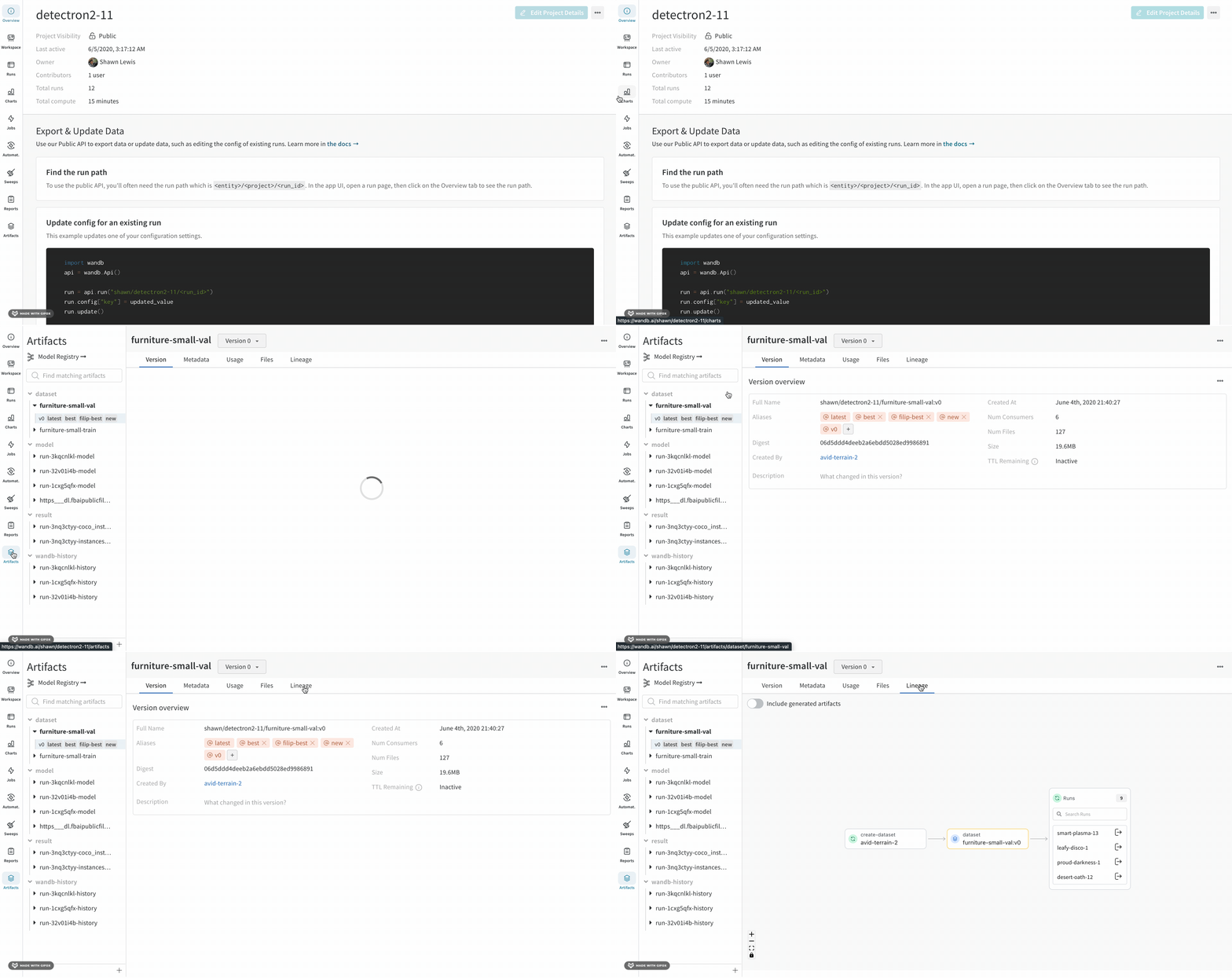
To view an artifact's lineage graph:
1. Navigate to the W\&B App.
2. Select the project that contains the run or artifact you want to explore.
3. Click on the **Artifacts** tab on the left sidebar.
4. Select the **Lineage** tab.
 ## Enable lineage graph tracking
To enable lineage graph tracking, you need to mark artifacts as [inputs](/models/artifacts/explore-and-traverse-an-artifact-graph) or
[outputs](/models/artifacts/explore-and-traverse-an-artifact-graph#track-the-output-of-a-run) of a run using the W\&B Python SDK.
### Track the input of a run
Mark an artifact as the input (or dependency) of a run with the [`wandb.Run.use_artifact()`](/ref/python/experiments/run/#method-runuse_artifact)
method. Specify the name of the artifact and an optional alias to reference a specific version of that artifact. The name of the
artifact is in the format `:` or `:`.
Replace values enclosed in angle brackets (`< >`) with your values:
```python theme={null}
import wandb
# Initialize a run
with wandb.init(entity="", project="") as run:
# Get artifact, mark it as a dependency
artifact = run.use_artifact(artifact_or_name="", aliases="")
```
### Track the output of a run
Use [`wandb.Run.log_artifact()`](/ref/python/experiments/run#log_artifact) to declare an artifact as an output of a run. First,
create an artifact with the [`wandb.Artifact()`](/ref/python/experiments/artifact/#wandb.Artifact) constructor. Then, log the
artifact as an output of the run with `wandb.Run.log_artifact()`.
Replace values enclosed in angle brackets (`< >`) with your values:
```python theme={null}
import wandb
# Initialize a run
with wandb.init(entity="", project="") as run:
# Create an artifact
artifact = wandb.Artifact(name = "", type = "")
artifact.add_file(local_path = "", name="")
# Log the artifact as an output of the run
run.log_artifact(artifact_or_path = artifact)
```
## Navigate lineage graphs
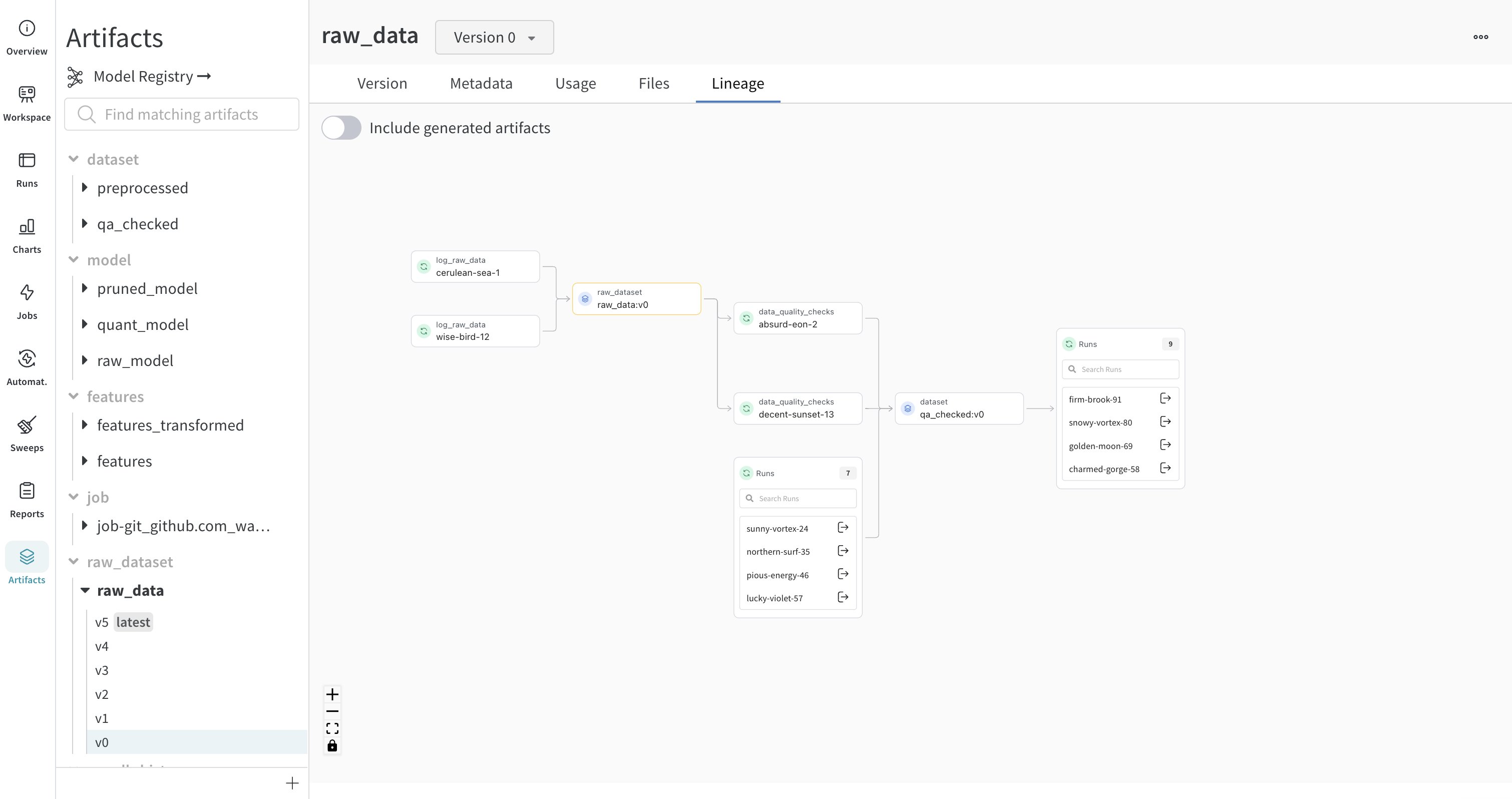
The artifact or job type you provide appears in front of its name, with artifacts represented by blue icons and runs represented by green icons. Arrows detail the input and output of a run or artifact on the graph.
## Enable lineage graph tracking
To enable lineage graph tracking, you need to mark artifacts as [inputs](/models/artifacts/explore-and-traverse-an-artifact-graph) or
[outputs](/models/artifacts/explore-and-traverse-an-artifact-graph#track-the-output-of-a-run) of a run using the W\&B Python SDK.
### Track the input of a run
Mark an artifact as the input (or dependency) of a run with the [`wandb.Run.use_artifact()`](/ref/python/experiments/run/#method-runuse_artifact)
method. Specify the name of the artifact and an optional alias to reference a specific version of that artifact. The name of the
artifact is in the format `:` or `:`.
Replace values enclosed in angle brackets (`< >`) with your values:
```python theme={null}
import wandb
# Initialize a run
with wandb.init(entity="", project="") as run:
# Get artifact, mark it as a dependency
artifact = run.use_artifact(artifact_or_name="", aliases="")
```
### Track the output of a run
Use [`wandb.Run.log_artifact()`](/ref/python/experiments/run#log_artifact) to declare an artifact as an output of a run. First,
create an artifact with the [`wandb.Artifact()`](/ref/python/experiments/artifact/#wandb.Artifact) constructor. Then, log the
artifact as an output of the run with `wandb.Run.log_artifact()`.
Replace values enclosed in angle brackets (`< >`) with your values:
```python theme={null}
import wandb
# Initialize a run
with wandb.init(entity="", project="") as run:
# Create an artifact
artifact = wandb.Artifact(name = "", type = "")
artifact.add_file(local_path = "", name="")
# Log the artifact as an output of the run
run.log_artifact(artifact_or_path = artifact)
```
## Navigate lineage graphs
The artifact or job type you provide appears in front of its name, with artifacts represented by blue icons and runs represented by green icons. Arrows detail the input and output of a run or artifact on the graph.
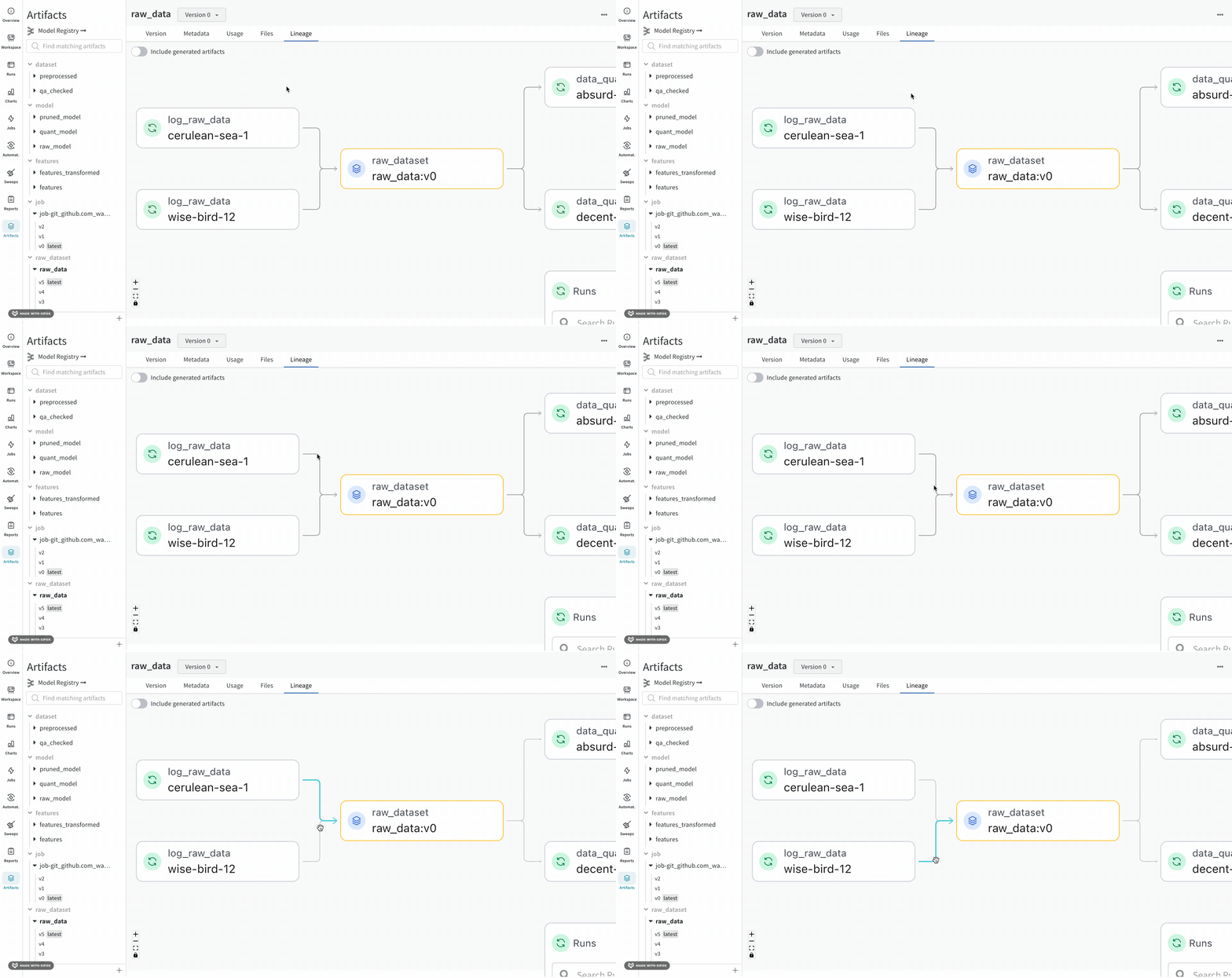
 You can view the type and the name of artifact in both the left sidebar and in the **Lineage** tab.
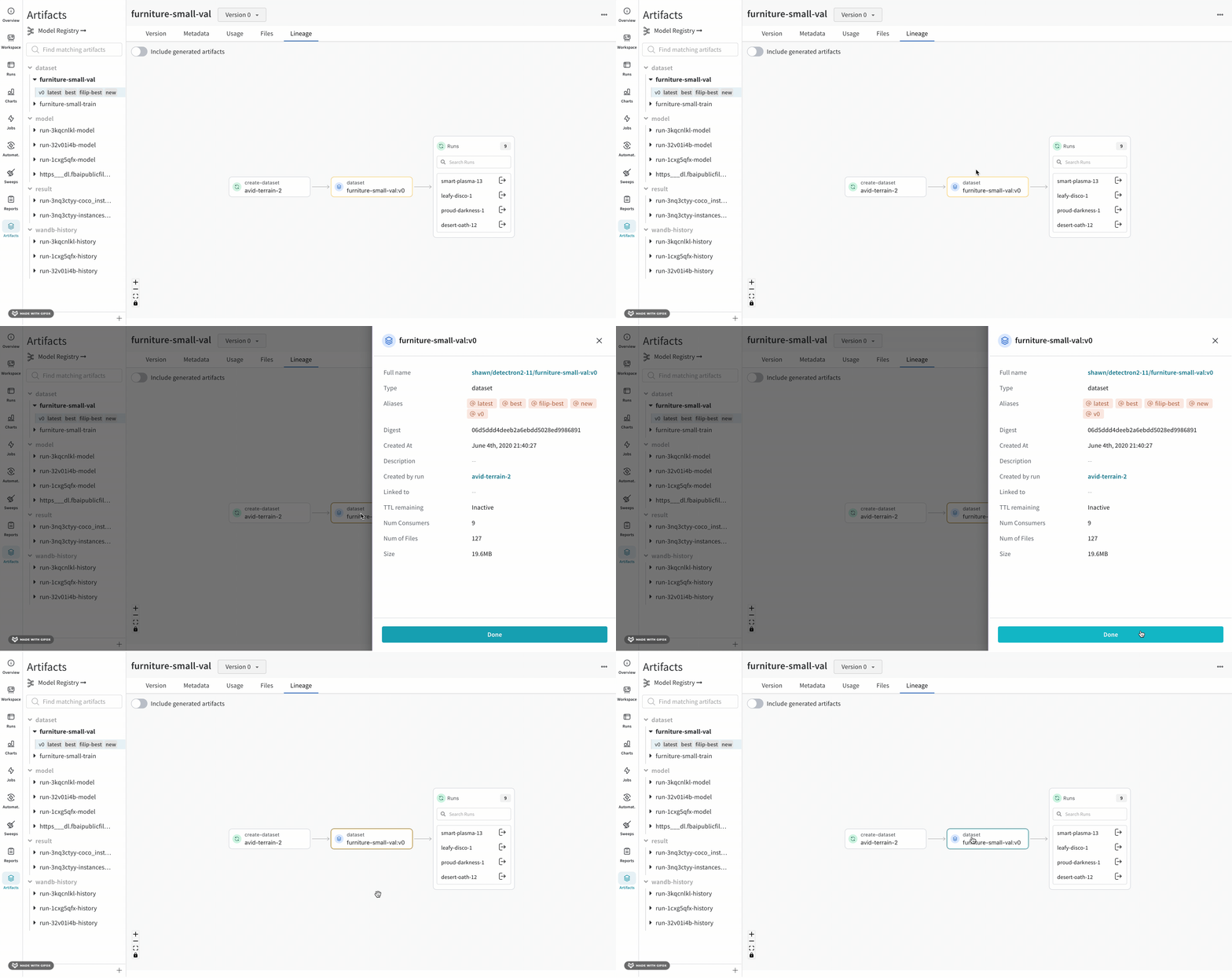
 For a more detailed view, click any individual artifact or run to get more information on a particular object.
 ## Artifact clusters
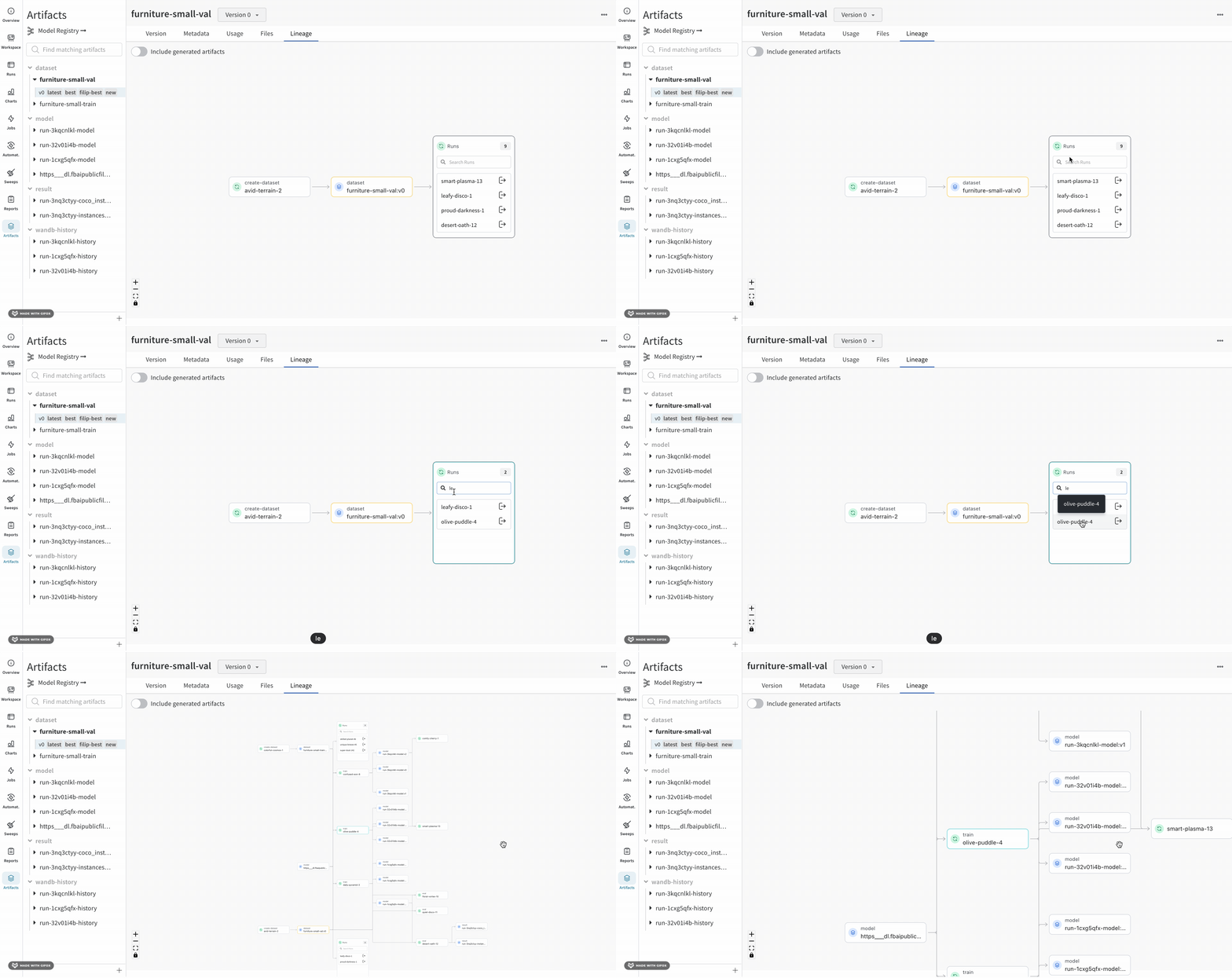
When a level of the graph has five or more runs or artifacts, it creates a cluster. A cluster has a search bar to find specific versions of runs or artifacts and pulls an individual node from a cluster to continue investigating the lineage of a node inside a cluster.
Clicking on a node opens a preview with an overview of the node. Clicking on the arrow extracts the individual run or artifact so you can examine the lineage of the extracted node.
## Artifact clusters
When a level of the graph has five or more runs or artifacts, it creates a cluster. A cluster has a search bar to find specific versions of runs or artifacts and pulls an individual node from a cluster to continue investigating the lineage of a node inside a cluster.
Clicking on a node opens a preview with an overview of the node. Clicking on the arrow extracts the individual run or artifact so you can examine the lineage of the extracted node.
 ## Navigate an artifact graph programmatically
Programmatically navigate a graph using the W\&B Python SDK. Use an artifact object's
[`logged_by()`](/models/ref/python/experiments/artifact#method-artifact-logged-by) and [`used_by()`](/models/ref/python/experiments/artifact#method-artifact-used-by) methods to walk the graph:
```python theme={null}
with wandb.init() as run:
artifact = run.use_artifact("artifact_name:latest")
# Walk up and down the graph from an artifact:
producer_run = artifact.logged_by()
consumer_runs = artifact.used_by()
```
## Navigate an artifact graph programmatically
Programmatically navigate a graph using the W\&B Python SDK. Use an artifact object's
[`logged_by()`](/models/ref/python/experiments/artifact#method-artifact-logged-by) and [`used_by()`](/models/ref/python/experiments/artifact#method-artifact-used-by) methods to walk the graph:
```python theme={null}
with wandb.init() as run:
artifact = run.use_artifact("artifact_name:latest")
# Walk up and down the graph from an artifact:
producer_run = artifact.logged_by()
consumer_runs = artifact.used_by()
```