> ## Documentation Index
> Fetch the complete documentation index at: https://wb-21fd5541-feat-cli-docs-generator.mintlify.site/llms.txt
> Use this file to discover all available pages before exploring further.
> How to integrate W&B with Kubeflow Pipelines.
# Kubeflow Pipelines (kfp)
[Kubeflow Pipelines (kfp) ](https://www.kubeflow.org/docs/components/pipelines/overview/)is a platform for building and deploying portable, scalable machine learning (ML) workflows based on Docker containers.
This integration lets users apply decorators to kfp python functional components to automatically log parameters and artifacts to W\&B.
This feature was enabled in `wandb==0.12.11` and requires `kfp<2.0.0`
## Sign up and create an API key
An API key authenticates your machine to W\&B. You can generate an API key from your user profile.
For a more streamlined approach, you can generate an API key by going directly to the [W\&B authorization page](https://wandb.ai/authorize). Copy the displayed API key and save it in a secure location such as a password manager.
1. Click your user profile icon in the upper right corner.
2. Select **User Settings**, then scroll to the **API Keys** section.
3. Click **Reveal**. Copy the displayed API key. To hide the API key, reload the page.
## Install the `wandb` library and log in
To install the `wandb` library locally and log in:
1. Set the `WANDB_API_KEY` [environment variable](/models/track/environment-variables/) to your API key.
```bash theme={null}
export WANDB_API_KEY=
```
2. Install the `wandb` library and log in.
```shell theme={null}
pip install wandb
wandb login
```
```bash theme={null}
pip install wandb
```
```python theme={null}
import wandb
wandb.login()
```
```notebook theme={null}
!pip install wandb
import wandb
wandb.login()
```
## Decorate your components
Add the `@wandb_log` decorator and create your components as usual. This will automatically log the input/outputs parameters and artifacts to W\&B each time you run your pipeline.
```python theme={null}
from kfp import components
from wandb.integration.kfp import wandb_log
@wandb_log
def add(a: float, b: float) -> float:
return a + b
add = components.create_component_from_func(add)
```
## Pass environment variables to containers
You may need to explicitly pass [environment variables](/models/track/environment-variables/) to your containers. For two-way linking, you should also set the environment variables `WANDB_KUBEFLOW_URL` to the base URL of your Kubeflow Pipelines instance. For example, `https://kubeflow.mysite.com`.
```python theme={null}
import os
from kubernetes.client.models import V1EnvVar
def add_wandb_env_variables(op):
env = {
"WANDB_API_KEY": os.getenv("WANDB_API_KEY"),
"WANDB_BASE_URL": os.getenv("WANDB_BASE_URL"),
}
for name, value in env.items():
op = op.add_env_variable(V1EnvVar(name, value))
return op
@dsl.pipeline(name="example-pipeline")
def example_pipeline(param1: str, param2: int):
conf = dsl.get_pipeline_conf()
conf.add_op_transformer(add_wandb_env_variables)
```
## Access your data programmatically
### Via the Kubeflow Pipelines UI
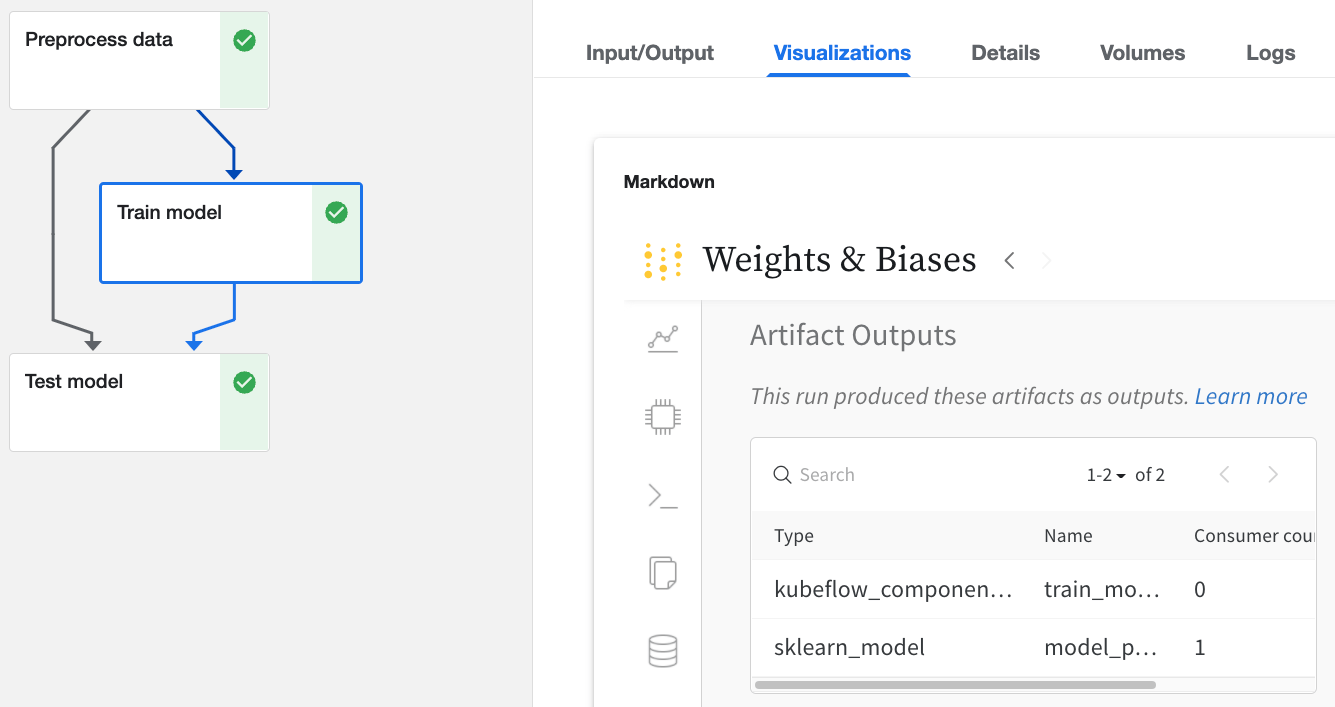
Click on any Run in the Kubeflow Pipelines UI that has been logged with W\&B.
* Find details about inputs and outputs in the `Input/Output` and `ML Metadata` tabs.
* View the W\&B web app from the `Visualizations` tab.
 ### Via the web app UI
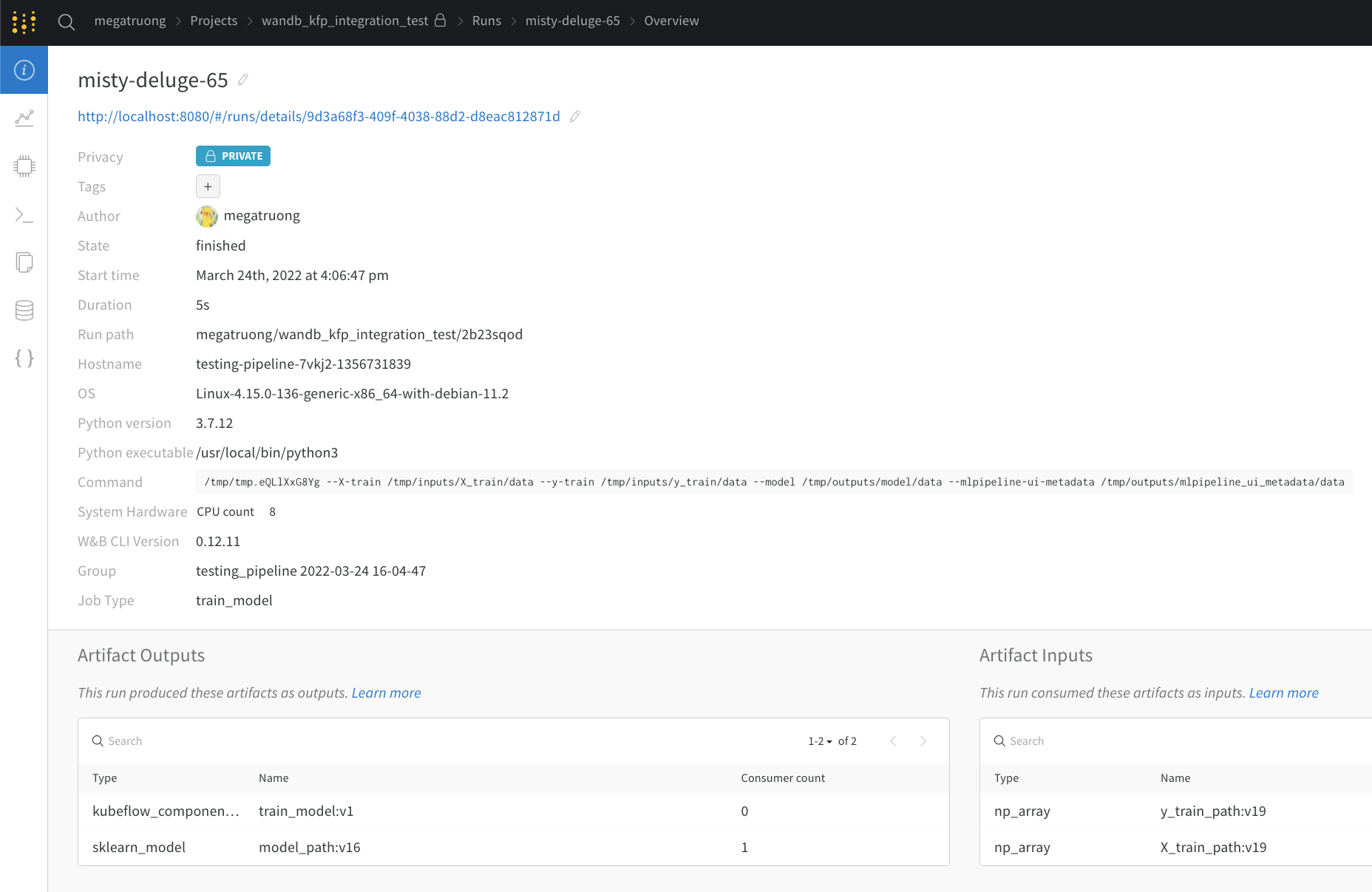
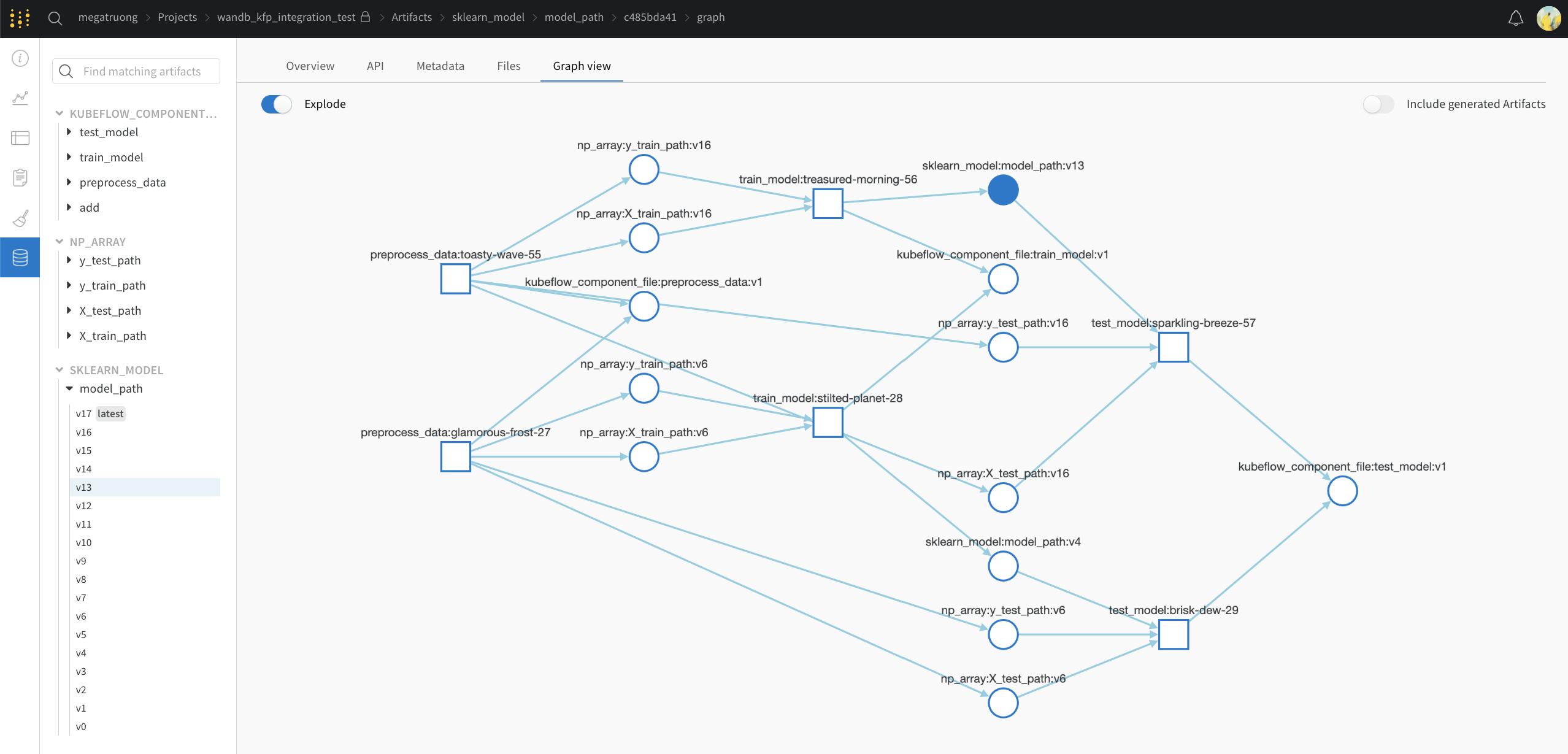
The web app UI has the same content as the `Visualizations` tab in Kubeflow Pipelines, but with more space. Learn [more about the web app UI here](/models/app).
### Via the web app UI
The web app UI has the same content as the `Visualizations` tab in Kubeflow Pipelines, but with more space. Learn [more about the web app UI here](/models/app).
 ### Via the Public API (for programmatic access)
* For programmatic access, [see our Public API](/models/ref/python/public-api/).
### Concept mapping from Kubeflow Pipelines to W\&B
Here's a mapping of Kubeflow Pipelines concepts to W\&B
| Kubeflow Pipelines | W\&B | Location in W\&B |
| ------------------ | --------------------- | -------------------------------------------- |
| Input Scalar | [`config`](/models/) | [Overview tab](/models/runs/#overview-tab) |
| Output Scalar | [`summary`](/models/) | [Overview tab](/models/runs/#overview-tab) |
| Input Artifact | Input Artifact | [Artifacts tab](/models/runs/#artifacts-tab) |
| Output Artifact | Output Artifact | [Artifacts tab](/models/runs/#artifacts-tab) |
## Fine-grain logging
If you want finer control of logging, you can sprinkle in `wandb.log` and `wandb.log_artifact` calls in the component.
### With explicit `wandb.log_artifacts` calls
In this example below, we are training a model. The `@wandb_log` decorator will automatically track the relevant inputs and outputs. If you want to log the training process, you can explicitly add that logging like so:
```python theme={null}
@wandb_log
def train_model(
train_dataloader_path: components.InputPath("dataloader"),
test_dataloader_path: components.InputPath("dataloader"),
model_path: components.OutputPath("pytorch_model"),
):
with wandb.init() as run:
...
for epoch in epochs:
for batch_idx, (data, target) in enumerate(train_dataloader):
...
if batch_idx % log_interval == 0:
run.log(
{"epoch": epoch, "step": batch_idx * len(data), "loss": loss.item()}
)
...
run.log_artifact(model_artifact)
```
### With implicit wandb integrations
If you're using a [framework integration we support](/models/integrations), you can also pass in the callback directly:
```python theme={null}
@wandb_log
def train_model(
train_dataloader_path: components.InputPath("dataloader"),
test_dataloader_path: components.InputPath("dataloader"),
model_path: components.OutputPath("pytorch_model"),
):
from pytorch_lightning.loggers import WandbLogger
from pytorch_lightning import Trainer
trainer = Trainer(logger=WandbLogger())
... # do training
```
### Via the Public API (for programmatic access)
* For programmatic access, [see our Public API](/models/ref/python/public-api/).
### Concept mapping from Kubeflow Pipelines to W\&B
Here's a mapping of Kubeflow Pipelines concepts to W\&B
| Kubeflow Pipelines | W\&B | Location in W\&B |
| ------------------ | --------------------- | -------------------------------------------- |
| Input Scalar | [`config`](/models/) | [Overview tab](/models/runs/#overview-tab) |
| Output Scalar | [`summary`](/models/) | [Overview tab](/models/runs/#overview-tab) |
| Input Artifact | Input Artifact | [Artifacts tab](/models/runs/#artifacts-tab) |
| Output Artifact | Output Artifact | [Artifacts tab](/models/runs/#artifacts-tab) |
## Fine-grain logging
If you want finer control of logging, you can sprinkle in `wandb.log` and `wandb.log_artifact` calls in the component.
### With explicit `wandb.log_artifacts` calls
In this example below, we are training a model. The `@wandb_log` decorator will automatically track the relevant inputs and outputs. If you want to log the training process, you can explicitly add that logging like so:
```python theme={null}
@wandb_log
def train_model(
train_dataloader_path: components.InputPath("dataloader"),
test_dataloader_path: components.InputPath("dataloader"),
model_path: components.OutputPath("pytorch_model"),
):
with wandb.init() as run:
...
for epoch in epochs:
for batch_idx, (data, target) in enumerate(train_dataloader):
...
if batch_idx % log_interval == 0:
run.log(
{"epoch": epoch, "step": batch_idx * len(data), "loss": loss.item()}
)
...
run.log_artifact(model_artifact)
```
### With implicit wandb integrations
If you're using a [framework integration we support](/models/integrations), you can also pass in the callback directly:
```python theme={null}
@wandb_log
def train_model(
train_dataloader_path: components.InputPath("dataloader"),
test_dataloader_path: components.InputPath("dataloader"),
model_path: components.OutputPath("pytorch_model"),
):
from pytorch_lightning.loggers import WandbLogger
from pytorch_lightning import Trainer
trainer = Trainer(logger=WandbLogger())
... # do training
```