> ## Documentation Index
> Fetch the complete documentation index at: https://wb-21fd5541-feat-cli-docs-generator.mintlify.site/llms.txt
> Use this file to discover all available pages before exploring further.
# Find registry items
Use the [global search bar in the W\&B Registry](./search_registry#search-for-registry-items) to find a registry, collection, artifact version tag, collection tag, or alias. You can use MongoDB-style queries to [filter registries, collections, and artifact versions](./search_registry#query-registry-items-with-mongodb-style-queries) based on specific criteria using the W\&B Python SDK.
Only items that you have permission to view appear in the search results.
## Search for registry items
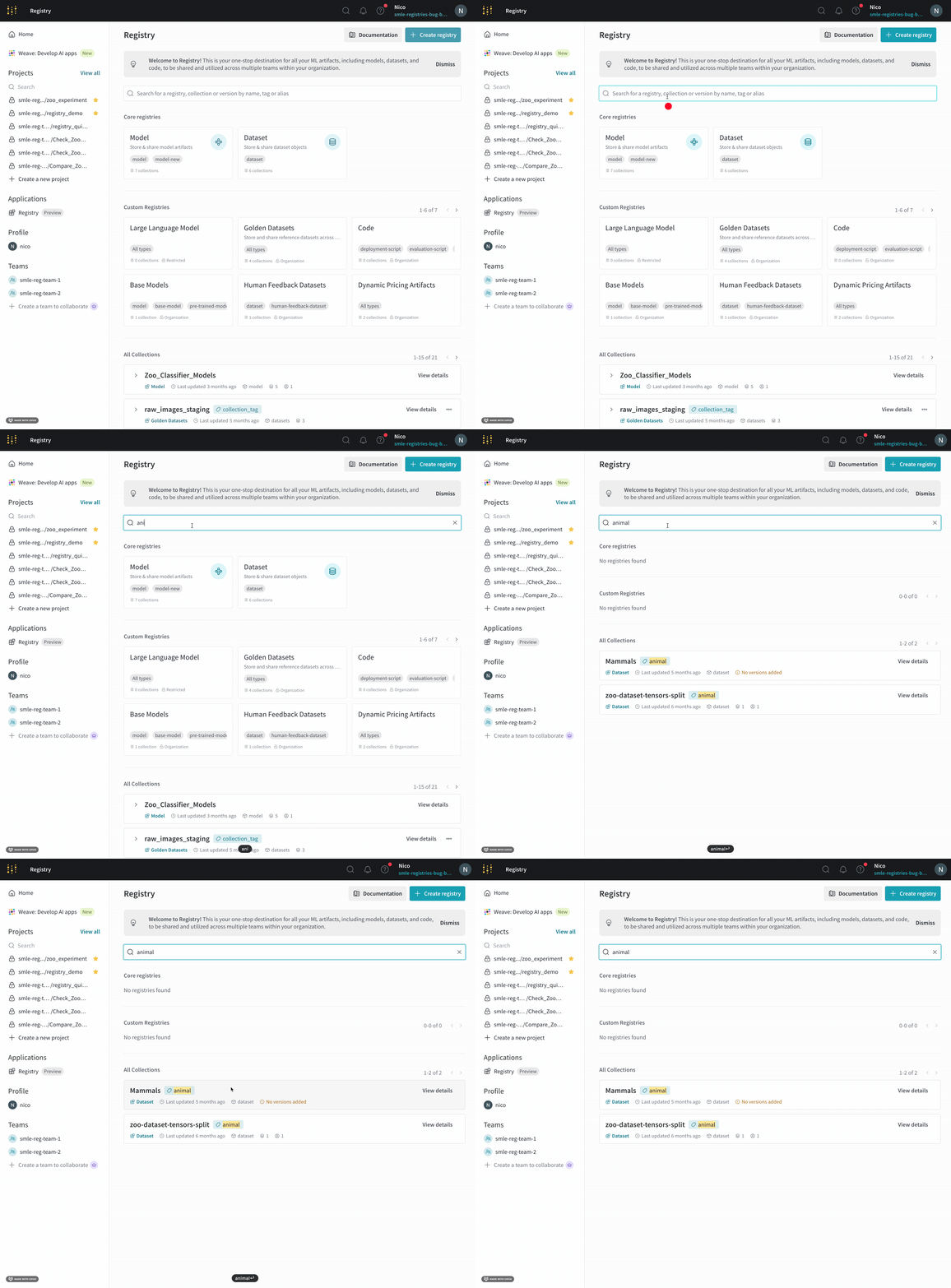
To search for a registry item:
1. Navigate to the W\&B Registry.
2. Specify the search term in the search bar at the top of the page. Press Enter to search.
Search results appear below the search bar if the term you specify matches an existing registry, collection name, artifact version tag, collection tag, or alias.
 ## Query registry items with MongoDB-style queries
Use the [`wandb.Api().registries()`](/models/ref/python/public-api/api#registries) and [query predicates](https://www.mongodb.com/docs/manual/reference/glossary/#std-term-query-predicate) to filter registries, collections, and artifact versions based on one or more [MongoDB-style queries](https://www.mongodb.com/docs/compass/current/query/filter/).
The following table lists query names you can use based on the type of item you want to filter:
| | query name |
| ----------- | -------------------------------------------------------- |
| registries | `name`, `description`, `created_at`, `updated_at` |
| collections | `name`, `tag`, `description`, `created_at`, `updated_at` |
| versions | `tag`, `alias`, `created_at`, `updated_at`, `metadata` |
The following code examples demonstrate some common search scenarios.
To use the `wandb.Api().registries()` method, first import the W\&B Python SDK ([`wandb`](/models/ref/python/)) library:
```python theme={null}
import wandb
# (Optional) Create an instance of the wandb.Api() class for readability
api = wandb.Api()
```
Filter all registries that contain the string `model`:
```python theme={null}
# Filter all registries that contain the string `model`
registry_filters = {
"name": {"$regex": "model"}
}
# Returns an iterable of all registries that match the filters
registries = api.registries(filter=registry_filters)
```
Filter all collections, independent of registry, that contains the string `yolo` in the collection name:
```python theme={null}
# Filter all collections, independent of registry, that
# contains the string `yolo` in the collection name
collection_filters = {
"name": {"$regex": "yolo"}
}
# Returns an iterable of all collections that match the filters
collections = api.registries().collections(filter=collection_filters)
```
Filter all collections, independent of registry, that contains the string `yolo` in the collection name and possesses `cnn` as a tag:
```python theme={null}
# Filter all collections, independent of registry, that contains the
# string `yolo` in the collection name and possesses `cnn` as a tag
collection_filters = {
"name": {"$regex": "yolo"},
"tag": "cnn"
}
# Returns an iterable of all collections that match the filters
collections = api.registries().collections(filter=collection_filters)
```
Find all artifact versions that contains the string `model` and has either the tag `image-classification` or an `latest` alias:
```python theme={null}
# Find all artifact versions that contains the string `model` and
# has either the tag `image-classification` or an `latest` alias
registry_filters = {
"name": {"$regex": "model"}
}
# Use logical $or operator to filter artifact versions
version_filters = {
"$or": [
{"tag": "image-classification"},
{"alias": "production"}
]
}
# Returns an iterable of all artifact versions that match the filters
artifacts = api.registries(filter=registry_filters).collections().versions(filter=version_filters)
```
See the MongoDB documentation for more information on [logical query operators](https://www.mongodb.com/docs/manual/reference/operator/query-logical/).
Each item in the `artifacts` iterable in the previous code snippet is an instance of the `Artifact` class. This means that you can access each artifact's attributes, such as `name`, `collection`, `aliases`, `tags`, `created_at`, and more:
```python theme={null}
for art in artifacts:
print(f"artifact name: {art.name}")
print(f"collection artifact belongs to: { art.collection.name}")
print(f"artifact aliases: {art.aliases}")
print(f"tags attached to artifact: {art.tags}")
print(f"artifact created at: {art.created_at}\n")
```
For a complete list of an artifact object's attributes, see the [Artifacts Class](/models/ref/python/experiments/artifact/) in the API Reference docs.
Filter all artifact versions, independent of registry or collection, created between 2024-01-08 and 2025-03-04 at 13:10 UTC:
```python theme={null}
# Find all artifact versions created between 2024-01-08 and 2025-03-04 at 13:10 UTC.
artifact_filters = {
"alias": "latest",
"created_at" : {"$gte": "2024-01-08", "$lte": "2025-03-04 13:10:00"},
}
# Returns an iterable of all artifact versions that match the filters
artifacts = api.registries().collections().versions(filter=artifact_filters)
```
Specify the date and time in the format `YYYY-MM-DD HH:MM:SS`. You can omit the hours, minutes, and seconds if you want to filter by date only.
See the MongoDB documentation for more information on [query predicates](https://www.mongodb.com/docs/manual/reference/mql/query-predicates/logical/).
## Query registry items with MongoDB-style queries
Use the [`wandb.Api().registries()`](/models/ref/python/public-api/api#registries) and [query predicates](https://www.mongodb.com/docs/manual/reference/glossary/#std-term-query-predicate) to filter registries, collections, and artifact versions based on one or more [MongoDB-style queries](https://www.mongodb.com/docs/compass/current/query/filter/).
The following table lists query names you can use based on the type of item you want to filter:
| | query name |
| ----------- | -------------------------------------------------------- |
| registries | `name`, `description`, `created_at`, `updated_at` |
| collections | `name`, `tag`, `description`, `created_at`, `updated_at` |
| versions | `tag`, `alias`, `created_at`, `updated_at`, `metadata` |
The following code examples demonstrate some common search scenarios.
To use the `wandb.Api().registries()` method, first import the W\&B Python SDK ([`wandb`](/models/ref/python/)) library:
```python theme={null}
import wandb
# (Optional) Create an instance of the wandb.Api() class for readability
api = wandb.Api()
```
Filter all registries that contain the string `model`:
```python theme={null}
# Filter all registries that contain the string `model`
registry_filters = {
"name": {"$regex": "model"}
}
# Returns an iterable of all registries that match the filters
registries = api.registries(filter=registry_filters)
```
Filter all collections, independent of registry, that contains the string `yolo` in the collection name:
```python theme={null}
# Filter all collections, independent of registry, that
# contains the string `yolo` in the collection name
collection_filters = {
"name": {"$regex": "yolo"}
}
# Returns an iterable of all collections that match the filters
collections = api.registries().collections(filter=collection_filters)
```
Filter all collections, independent of registry, that contains the string `yolo` in the collection name and possesses `cnn` as a tag:
```python theme={null}
# Filter all collections, independent of registry, that contains the
# string `yolo` in the collection name and possesses `cnn` as a tag
collection_filters = {
"name": {"$regex": "yolo"},
"tag": "cnn"
}
# Returns an iterable of all collections that match the filters
collections = api.registries().collections(filter=collection_filters)
```
Find all artifact versions that contains the string `model` and has either the tag `image-classification` or an `latest` alias:
```python theme={null}
# Find all artifact versions that contains the string `model` and
# has either the tag `image-classification` or an `latest` alias
registry_filters = {
"name": {"$regex": "model"}
}
# Use logical $or operator to filter artifact versions
version_filters = {
"$or": [
{"tag": "image-classification"},
{"alias": "production"}
]
}
# Returns an iterable of all artifact versions that match the filters
artifacts = api.registries(filter=registry_filters).collections().versions(filter=version_filters)
```
See the MongoDB documentation for more information on [logical query operators](https://www.mongodb.com/docs/manual/reference/operator/query-logical/).
Each item in the `artifacts` iterable in the previous code snippet is an instance of the `Artifact` class. This means that you can access each artifact's attributes, such as `name`, `collection`, `aliases`, `tags`, `created_at`, and more:
```python theme={null}
for art in artifacts:
print(f"artifact name: {art.name}")
print(f"collection artifact belongs to: { art.collection.name}")
print(f"artifact aliases: {art.aliases}")
print(f"tags attached to artifact: {art.tags}")
print(f"artifact created at: {art.created_at}\n")
```
For a complete list of an artifact object's attributes, see the [Artifacts Class](/models/ref/python/experiments/artifact/) in the API Reference docs.
Filter all artifact versions, independent of registry or collection, created between 2024-01-08 and 2025-03-04 at 13:10 UTC:
```python theme={null}
# Find all artifact versions created between 2024-01-08 and 2025-03-04 at 13:10 UTC.
artifact_filters = {
"alias": "latest",
"created_at" : {"$gte": "2024-01-08", "$lte": "2025-03-04 13:10:00"},
}
# Returns an iterable of all artifact versions that match the filters
artifacts = api.registries().collections().versions(filter=artifact_filters)
```
Specify the date and time in the format `YYYY-MM-DD HH:MM:SS`. You can omit the hours, minutes, and seconds if you want to filter by date only.
See the MongoDB documentation for more information on [query predicates](https://www.mongodb.com/docs/manual/reference/mql/query-predicates/logical/).