

 Platform
 W&B Models
 W&B Weave
 W&B Inference
 W&B Training
 Release Notes
Environment variable reference
Use the GORILLA_DATA_RETENTION_PERIOD environment variable cautiously. Data is removed immediately once the environment variable is set. We also recommend that you backup both the database and the storage bucket before you enable this flag.
Advanced Reliability Settings
Redis
Configuring an external Redis server is optional but recommended for production systems. Redis helps improve the reliability of the service and enable caching to decrease load times, especially in large projects. Use a managed Redis service such ElastiCache with high availability (HA) and the following specifications:- Minimum 4GB of memory, suggested 8GB
- Redis version 6.x
- In transit encryption
- Authentication enabled
http(s)://YOUR-W&B-SERVER-HOST/system-admin. Enable the “Use an external Redis instance” option, and fill in the Redis connection string in the following format:
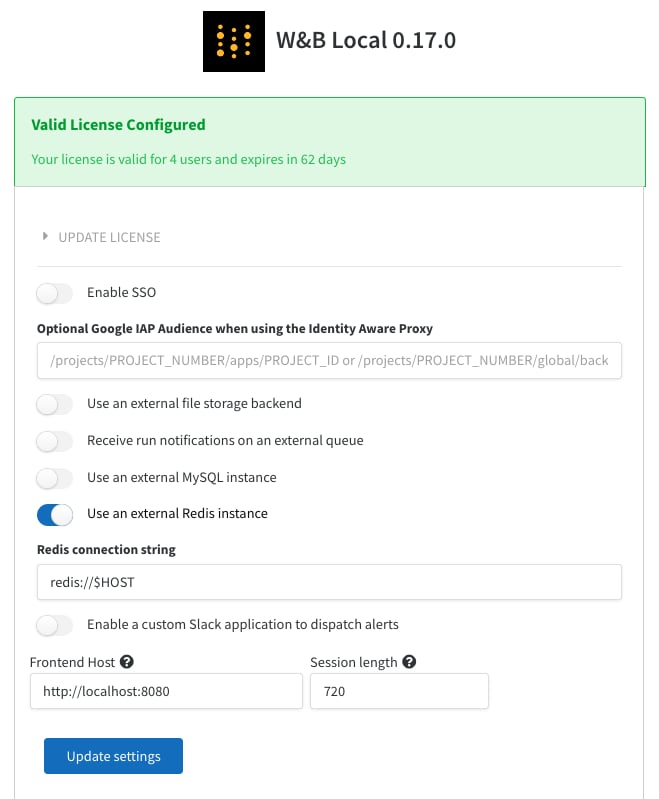
REDIS on the container or in your Kubernetes deployment. Alternatively, you could also setup REDIS as a Kubernetes secret.
This page assumes the Redis instance is running at the default port of 6379. If you configure a different port, setup authentication and also want to have TLS enabled on the redis instance the connection string format would look something like: redis://$USER:$PASSWORD@$HOST:$PORT?tls=true