> ## Documentation Index
> Fetch the complete documentation index at: https://wb-21fd5541-feat-cli-docs-generator.mintlify.site/llms.txt
> Use this file to discover all available pages before exploring further.
# Evaluations overview
> Evaluation-driven LLM application development to systematically improve applications
*Evaluation-driven LLM application development* helps you systematically improve LLM applications by systematically measuring their behavior using consistent, curated examples.
In Weave, the core of the workflow is the *`Evaluation` object*, which defines:
* A [`Dataset`](../core-types/datasets) or list of dictionaries for test examples.
* One or more [scoring functions](../evaluation/scorers).
* Optional configuration like [input preprocessing](#format-dataset-rows-before-evaluating).
Once you’ve defined the `Evaluation`, you can run it against a [`Model`](../core-types/models) object or any custom function containing LLM application logic. Each call to `.evaluate()` triggers an *evaluation run*. Think of the `Evaluation` object as a blueprint, and each run as a measurement of how your application performs under that setup.
To get started with evaluations, complete the following steps:
1. [Create an `Evaluation` object](#1-create-an-evaluation-object)
2. [Define a dataset of examples](#2-define-a-datset-of-test-examples)
3. [Define scoring functions](#3-define-scoring-functions)
4. [Define a `Model` to evaluate](#4-define-a-model-to-evaluate)
5. [Run the evaluation](#5-run-the-evaluation)
A complete evaluation code sample can be found [here](#full-evaluation-code-sample). You can also learn more about [advanced evaluation features](#advanced-evaluation-usage) like [Saved views](#saved-views) and [Imperative evaluations](#imperative-evaluations-evaluationlogger).
## 1. Create an `Evaluation` object
Creating an `Evaluation` object is the first step in setting up your evaluation configuration. An `Evaluation` consists of example data, scoring logic, and optional preprocessing. You’ll later use it to run one or more evaluations.
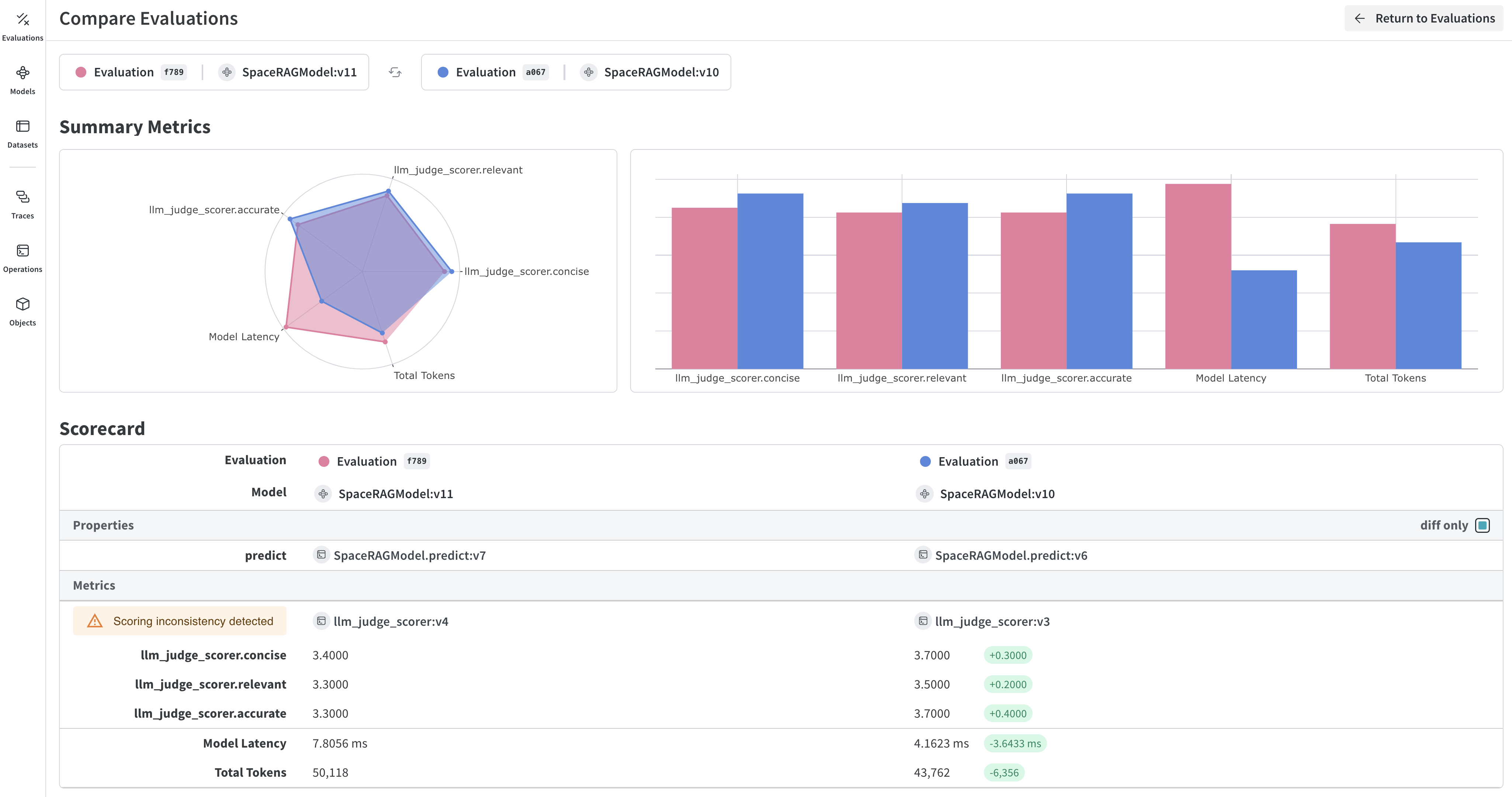
Weave will take each example, pass it through your application and score the output on multiple custom scoring functions. By doing this, you'll have a view of the performance of your application, and a rich UI to drill into individual outputs and scores.
### (Optional) Custom naming
There are two types of customizable names in the evaluation flow:
* [*Evaluation object name* (`evaluation_name`)](#name-the-evaluation-object): A persistent label for your configured `Evaluation` object.
* [*Evaluation run display name* (`__weave["display_name"]`)](#name-individual-evaluation-runs): A label for a specific evaluation execution, shown in the UI.
#### Name the `Evaluation` object
To name the `Evaluation` object itself, pass an `evaluation_name` parameter to the `Evaluation` class. This name helps you identify the Evaluation in code and UI listings.
```python lines theme={null}
evaluation = Evaluation(
dataset=examples, scorers=[match_score1], evaluation_name="My Evaluation"
)
```
#### Name individual evaluation runs
To name a specific evaluation run (a call to `evaluate()`), use the `__weave` dictionary with a `display_name`. This affects what is shown in the UI for that run.
```python lines theme={null}
evaluation = Evaluation(
dataset=examples, scorers=[match_score1]
)
evaluation.evaluate(model, __weave={"display_name": "My Evaluation Run"})
```
## 2. Define a datset of test examples
First, define a [Dataset](../core-types/datasets) object or list of dictionaries with a collection of examples to be evaluated. These examples are often failure cases that you want to test for, these are similar to unit tests in Test-Driven Development (TDD).
The following examples shows a dataset defined as a list of dictionaries:
```python lines theme={null}
examples = [
{"question": "What is the capital of France?", "expected": "Paris"},
{"question": "Who wrote 'To Kill a Mockingbird'?", "expected": "Harper Lee"},
{"question": "What is the square root of 64?", "expected": "8"},
]
```
## 3. Define scoring functions
Then, create one or more [scoring functions](../evaluation/scorers). These are used to score each example in the `Dataset`. Each scoring function must have a `output`, and return a dictionary with the scores. Optionally, you can include other inputs from your examples.
Scoring functions need to have a `output` keyword argument, but the other arguments are user defined and are taken from the dataset examples. It will only take the necessary keys by using a dictionary key based on the argument name.
If your scorer expects an `output` argument but isn’t receiving it, check if it might be using the legacy `model_output` key. To fix this, update your scorer function to use output as a keyword argument.
The following example scorer function `match_score1` uses the `expected` value from the `examples` dictionary for scoring.
```python lines theme={null}
import weave
# Collect your examples
examples = [
{"question": "What is the capital of France?", "expected": "Paris"},
{"question": "Who wrote 'To Kill a Mockingbird'?", "expected": "Harper Lee"},
{"question": "What is the square root of 64?", "expected": "8"},
]
# Define any custom scoring function
@weave.op()
def match_score1(expected: str, output: dict) -> dict:
# Here is where you'd define the logic to score the model output
return {'match': expected == output['generated_text']}
```
### (Optional) Define a custom `Scorer` class
In some applications we want to create custom `Scorer` classes - where for example a standardized `LLMJudge` class should be created with specific parameters (e.g. chat model, prompt), specific scoring of each row, and specific calculation of an aggregate score.
See the tutorial on defining a `Scorer` class in [Model-Based Evaluation of RAG applications](/weave/tutorial-rag#optional-defining-a-scorer-class) for more information.
## 4. Define a `Model` to evaluate
To evaluate a `Model`, call `evaluate` on it using an `Evaluation`. `Models` are used when you have parameters that you want to experiment with and capture in weave.
```python lines theme={null}
from weave import Model, Evaluation
import asyncio
class MyModel(Model):
prompt: str
@weave.op()
def predict(self, question: str):
# here's where you would add your LLM call and return the output
return {'generated_text': 'Hello, ' + self.prompt}
model = MyModel(prompt='World')
evaluation = Evaluation(
dataset=examples, scorers=[match_score1]
)
weave.init('intro-example') # begin tracking results with weave
asyncio.run(evaluation.evaluate(model))
```
This will run `predict` on each example and score the output with each scoring functions.
### (Optional) Define a function to evaluate
Alternatively, you can also evaluate a custom function tracked by `@weave.op()`.
```python lines theme={null}
@weave.op
def function_to_evaluate(question: str):
# here's where you would add your LLM call and return the output
return {'generated_text': 'some response'}
asyncio.run(evaluation.evaluate(function_to_evaluate))
```
## 5. Run the evaluation
To run an evaluation, call `.evaluate()` on the object you want to evaluate.
For example, assuming an `Evaluation` object called `evaluation` and a `Model` object to evaluate called `model`, the following code instatiates an evaluation run.
```python lines theme={null}
asyncio.run(evaluation.evaluate(model))
```
**Evaluation run tips**
1. The `evaluate()` method returns a summary of results across all examples. To access the full set of scored rows including outputs and scores, use `get_eval_results()`.
2. If you don't provide a `display_name` when calling `.evaluate()`, Weave will automatically generate one using the date and a random memorable name. To learn more, see [how to name individual evaluation runs](#name-individual-evaluation-runs).
3. The model passed to `.evaluate` must be a `Model` or a function tracked with `@weave.op`. Regular Python functions are not supported unless wrapped with `@weave.op`.
### (Optional) Run multiple trials
You can set the `trials` parameter on the `Evaluation` object to run each example multiple times.
```python lines theme={null}
evaluation = Evaluation(dataset=examples, scorers=[match_score], trials=3)
```
Each example will be passed to the `model` three times, and each run will be scored and displayed independently in Weave.
## Full evaluation code sample
The following code sample demonstrates a complete evaluation run from start to finish. The `examples` dictionary is used by the `match_score1` and `match_score2` scoring functions to evaluate `MyModel` given the value of `prompt`, as well as a custom function `function_to_evaluate`. The evaluation runs for both the `Model` and the function are invoked via `asyncio.run(evaluation.evaluate()`.
```python lines theme={null}
from weave import Evaluation, Model
import weave
import asyncio
weave.init('intro-example')
examples = [
{"question": "What is the capital of France?", "expected": "Paris"},
{"question": "Who wrote 'To Kill a Mockingbird'?", "expected": "Harper Lee"},
{"question": "What is the square root of 64?", "expected": "8"},
]
@weave.op()
def match_score1(expected: str, output: dict) -> dict:
return {'match': expected == output['generated_text']}
@weave.op()
def match_score2(expected: dict, output: dict) -> dict:
return {'match': expected == output['generated_text']}
class MyModel(Model):
prompt: str
@weave.op()
def predict(self, question: str):
# here's where you would add your LLM call and return the output
return {'generated_text': 'Hello, ' + question + self.prompt}
model = MyModel(prompt='World')
evaluation = Evaluation(dataset=examples, scorers=[match_score1, match_score2])
asyncio.run(evaluation.evaluate(model))
@weave.op()
def function_to_evaluate(question: str):
# here's where you would add your LLM call and return the output
return {'generated_text': 'some response' + question}
asyncio.run(evaluation.evaluate(function_to_evaluate("What is the capitol of France?")))
```
 ## Advanced evaluation usage
### Format dataset rows before evaluating
The `preprocess_model_input` function is only applied to inputs before passing them to the model's prediction function. Scorer functions always receive the original dataset example, without any preprocessing applied.
The `preprocess_model_input` parameter allows you to transform your dataset examples before they are passed to your evaluation function. This is useful when you need to:
* Rename fields to match your model's expected input
* Transform data into the correct format
* Add or remove fields
* Load additional data for each example
Here's a simple example that shows how to use `preprocess_model_input` to rename fields:
```python lines theme={null}
import weave
from weave import Evaluation
import asyncio
# Our dataset has "input_text" but our model expects "question"
examples = [
{"input_text": "What is the capital of France?", "expected": "Paris"},
{"input_text": "Who wrote 'To Kill a Mockingbird'?", "expected": "Harper Lee"},
{"input_text": "What is the square root of 64?", "expected": "8"},
]
@weave.op()
def preprocess_example(example):
# Rename input_text to question
return {
"question": example["input_text"]
}
@weave.op()
def match_score(expected: str, output: dict) -> dict:
return {'match': expected == output['generated_text']}
@weave.op()
def function_to_evaluate(question: str):
return {'generated_text': f'Answer to: {question}'}
# Create evaluation with preprocessing
evaluation = Evaluation(
dataset=examples,
scorers=[match_score],
preprocess_model_input=preprocess_example
)
# Run the evaluation
weave.init('preprocessing-example')
asyncio.run(evaluation.evaluate(function_to_evaluate))
```
In this example, our dataset contains examples with an `input_text` field, but our evaluation function expects a `question` parameter. The `preprocess_example` function transforms each example by renaming the field, allowing the evaluation to work correctly.
The preprocessing function:
1. Receives the raw example from your dataset
2. Returns a dictionary with the fields your model expects
3. Is applied to each example before it's passed to your evaluation function
This is particularly useful when working with external datasets that may have different field names or structures than what your model expects.
### Use HuggingFace datasets with evaluations
We are continuously improving our integrations with third-party services and libraries.
While we work on building more seamless integrations, you can use `preprocess_model_input` as a temporary workaround for using HuggingFace Datasets in Weave evaluations.
See our [Using HuggingFace datasets in evaluations cookbook](/weave/cookbooks/hf_dataset_evals) for the current approach.
### Saved views
You can save your Evals table configurations, filters, and sorts as *saved views* for quick access to your preferred setup. You can configure and access saved views via the UI and the Python SDK. For more information, see [Saved Views](/weave/guides/tools/saved-views).
### Imperative evaluations (`EvaluationLogger`)
If you prefer a more flexible evaluation framework, check out Weave's [`EvaluationLogger`](../evaluation/evaluation_logger). The imperative approach offers more flexibility for complex workflows, while the standard evaluation framework provides more structure and guidance.
## Advanced evaluation usage
### Format dataset rows before evaluating
The `preprocess_model_input` function is only applied to inputs before passing them to the model's prediction function. Scorer functions always receive the original dataset example, without any preprocessing applied.
The `preprocess_model_input` parameter allows you to transform your dataset examples before they are passed to your evaluation function. This is useful when you need to:
* Rename fields to match your model's expected input
* Transform data into the correct format
* Add or remove fields
* Load additional data for each example
Here's a simple example that shows how to use `preprocess_model_input` to rename fields:
```python lines theme={null}
import weave
from weave import Evaluation
import asyncio
# Our dataset has "input_text" but our model expects "question"
examples = [
{"input_text": "What is the capital of France?", "expected": "Paris"},
{"input_text": "Who wrote 'To Kill a Mockingbird'?", "expected": "Harper Lee"},
{"input_text": "What is the square root of 64?", "expected": "8"},
]
@weave.op()
def preprocess_example(example):
# Rename input_text to question
return {
"question": example["input_text"]
}
@weave.op()
def match_score(expected: str, output: dict) -> dict:
return {'match': expected == output['generated_text']}
@weave.op()
def function_to_evaluate(question: str):
return {'generated_text': f'Answer to: {question}'}
# Create evaluation with preprocessing
evaluation = Evaluation(
dataset=examples,
scorers=[match_score],
preprocess_model_input=preprocess_example
)
# Run the evaluation
weave.init('preprocessing-example')
asyncio.run(evaluation.evaluate(function_to_evaluate))
```
In this example, our dataset contains examples with an `input_text` field, but our evaluation function expects a `question` parameter. The `preprocess_example` function transforms each example by renaming the field, allowing the evaluation to work correctly.
The preprocessing function:
1. Receives the raw example from your dataset
2. Returns a dictionary with the fields your model expects
3. Is applied to each example before it's passed to your evaluation function
This is particularly useful when working with external datasets that may have different field names or structures than what your model expects.
### Use HuggingFace datasets with evaluations
We are continuously improving our integrations with third-party services and libraries.
While we work on building more seamless integrations, you can use `preprocess_model_input` as a temporary workaround for using HuggingFace Datasets in Weave evaluations.
See our [Using HuggingFace datasets in evaluations cookbook](/weave/cookbooks/hf_dataset_evals) for the current approach.
### Saved views
You can save your Evals table configurations, filters, and sorts as *saved views* for quick access to your preferred setup. You can configure and access saved views via the UI and the Python SDK. For more information, see [Saved Views](/weave/guides/tools/saved-views).
### Imperative evaluations (`EvaluationLogger`)
If you prefer a more flexible evaluation framework, check out Weave's [`EvaluationLogger`](../evaluation/evaluation_logger). The imperative approach offers more flexibility for complex workflows, while the standard evaluation framework provides more structure and guidance.