> ## Documentation Index
> Fetch the complete documentation index at: https://wb-21fd5541-feat-cli-docs-generator.mintlify.site/llms.txt
> Use this file to discover all available pages before exploring further.
# Log evaluation data from your code
> Flexible, incremental way to log evaluation data from Python and TypeScript code
The `EvaluationLogger` provides a flexible, incremental way to log evaluation data directly from your Python or TypeScript code. You don't need deep knowledge of Weave's internal data types; simply instantiate a logger and use its methods (`log_prediction`, `log_score`, `log_summary`) to record evaluation steps.
This approach is particularly helpful in complex workflows where the entire dataset or all scorers might not be defined upfront.
In contrast to the standard `Evaluation` object, which requires a predefined `Dataset` and list of `Scorer` objects, the `EvaluationLogger` allows you to log individual predictions and their associated scores incrementally as they become available.
**Prefer a more structured evaluation?**
If you prefer a more opinionated evaluation framework with predefined datasets and scorers, see [Weave's standard Evaluation framework](../core-types/evaluations).
The `EvaluationLogger` offers flexibility while the standard framework offers structure and guidance.
## Basic workflow
1. *Initialize the logger:* Create an instance of `EvaluationLogger`, optionally providing metadata about the `model` and `dataset`. Defaults will be used if omitted.
:::important Track token usage and cost
To capture token usage and cost for LLM calls (e.g. OpenAI), initialize `EvaluationLogger` before any LLM invocations\*\*.
If you call your LLM first and then log predictions afterward, token and cost data are not captured.
:::
2. *Log predictions:* Call `log_prediction` for each input/output pair from your system.
3. *Log scores:* Use the returned `ScoreLogger` to `log_score` for the prediction. Multiple scores per prediction are supported.
4. *Finish prediction:* Always call `finish()` after logging scores for a prediction to finalize it.
5. *Log summary:* After all predictions are processed, call `log_summary` to aggregate scores and add optional custom metrics.
After calling `finish()` on a prediction, no more scores can be logged for it.
For a Python code demonstrating the described workflow, see the [Basic example](#basic-example).
## Basic example
The following example shows how to use `EvaluationLogger` to log predictions and scores inline with your existing code.
The `user_model` model function is defined and applied to a list of inputs. For each example:
* The input and output are logged using `log_prediction`.
* A simple correctness score (`correctness_score`) is logged via `log_score`.
* `finish()` finalizes logging for that prediction.
Finally, `log_summary` records any aggregate metrics and triggers automatic score summarization in Weave.
```python lines theme={null}
import weave
from openai import OpenAI
from weave import EvaluationLogger
weave.init('my-project')
# Initialize EvaluationLogger BEFORE calling the model to ensure token tracking
eval_logger = EvaluationLogger(
model="my_model",
dataset="my_dataset"
)
# Example input data (this can be any data structure you want)
eval_samples = [
{'inputs': {'a': 1, 'b': 2}, 'expected': 3},
{'inputs': {'a': 2, 'b': 3}, 'expected': 5},
{'inputs': {'a': 3, 'b': 4}, 'expected': 7},
]
# Example model logic using OpenAI
@weave.op
def user_model(a: int, b: int) -> int:
oai = OpenAI()
response = oai.chat.completions.create(
messages=[{"role": "user", "content": f"What is {a}+{b}?"}],
model="gpt-4o-mini"
)
# Use the response in some way (here we just return a + b for simplicity)
return a + b
# Iterate through examples, predict, and log
for sample in eval_samples:
inputs = sample["inputs"]
model_output = user_model(**inputs) # Pass inputs as kwargs
# Log the prediction input and output
pred_logger = eval_logger.log_prediction(
inputs=inputs,
output=model_output
)
# Calculate and log a score for this prediction
expected = sample["expected"]
correctness_score = model_output == expected
pred_logger.log_score(
scorer="correctness", # Simple string name for the scorer
score=correctness_score
)
# Finish logging for this specific prediction
pred_logger.finish()
# Log a final summary for the entire evaluation.
# Weave auto-aggregates the 'correctness' scores logged above.
summary_stats = {"subjective_overall_score": 0.8}
eval_logger.log_summary(summary_stats)
print("Evaluation logging complete. View results in the Weave UI.")
```
The TypeScript SDK provides two API patterns:
1. **Fire-and-forget API** (recommended for most cases): Use `logPrediction()` without `await` for synchronous, non-blocking logging
2. **Awaitable API**: Use `logPredictionAsync()` with `await` when you need to ensure operations complete before proceeding
We recommend **fire-and-forget** for:
* **High throughput**: Process multiple predictions in parallel without waiting for each logging operation
* **Minimal code disruption**: Add evaluation logging without restructuring your existing async/await flow
* **Simplicity**: Less boilerplate code and cleaner syntax for most evaluation scenarios
The fire-and-forget pattern is safe because `logSummary()` automatically waits for all pending operations to complete before aggregating results.
The following example evaluates model predictions with the fire-and-forget pattern. It sets up an evaluation logger, runs a simple model on three test samples, and then logs the prediction without using await:
```typescript lines theme={null}
import weave from 'weave';
import OpenAI from 'openai';
import {EvaluationLogger} from 'weave/evaluationLogger';
await weave.init('my-project');
// Initialize EvaluationLogger BEFORE calling the model to ensure token tracking
const evalLogger = new EvaluationLogger({
name: 'my-eval',
model: 'my_model',
dataset: 'my_dataset'
});
// Example input data (this can be any data structure you want)
const evalSamples = [
{inputs: {a: 1, b: 2}, expected: 3},
{inputs: {a: 2, b: 3}, expected: 5},
{inputs: {a: 3, b: 4}, expected: 7},
];
// Example model logic using OpenAI
const userModel = weave.op(async function userModel(a: number, b: number): Promise {
const oai = new OpenAI();
const response = await oai.chat.completions.create({
messages: [{role: 'user', content: `What is ${a}+${b}?`}],
model: 'gpt-4o-mini'
});
// Use the response in some way (here we just return a + b for simplicity)
return a + b;
});
// Iterate through examples, predict, and log using fire-and-forget pattern
for (const sample of evalSamples) {
const {inputs} = sample;
const modelOutput = await userModel(inputs.a, inputs.b);
// Fire-and-forget: No await needed for logPrediction
const scoreLogger = evalLogger.logPrediction(inputs, modelOutput);
// Calculate and log a score for this prediction
const correctnessScore = modelOutput === sample.expected;
// Fire-and-forget: No await needed for logScore
scoreLogger.logScore('correctness', correctnessScore);
// Fire-and-forget: No await needed for finish
scoreLogger.finish();
}
// logSummary waits for all pending operations to complete internally
// Weave auto-aggregates the 'correctness' scores logged above.
const summaryStats = {subjective_overall_score: 0.8};
await evalLogger.logSummary(summaryStats);
console.log('Evaluation logging complete. View results in the Weave UI.');
```
Use awaitable API when you need to ensure each operation completes before proceeding, such as when managing error handling or sequential dependencies.
In the the following example, instead of calling `logPrediction()` without `await`, it uses `logPredictionAsync()` with `await` to ensure each operation completes before proceeding to the next one:
```typescript lines theme={null}
// Use logPredictionAsync instead of logPrediction
const scoreLogger = await evalLogger.logPredictionAsync(inputs, modelOutput);
// Await each operation
await scoreLogger.logScore('correctness', correctnessScore);
await scoreLogger.finish();
```
## Advanced usage
The `EvaluationLogger` offers flexible patterns beyond the basic workflow to accommodate more complex evaluation scenarios. This section covers advanced techniques including using context managers for automatic resource management, separating model execution from logging, working with rich media data, and comparing multiple model evaluations side-by-side.
### Using context managers
The `EvaluationLogger` supports context managers (`with` statements) for both predictions and scores. This can provide cleaner code, automatic resource cleanup, and better tracking of nested operations like LLM judge calls.
Using `with` statements in this context provides:
* Automatic `finish()` calls when exiting the context
* Better token/cost tracking for nested LLM calls
* Setting output after model execution within the prediction context
```python lines {16,24,31,40} theme={null}
import openai
import weave
weave.init("nested-evaluation-example")
oai = openai.OpenAI()
# Initialize the logger
ev = weave.EvaluationLogger(
model="gpt-4o-mini",
dataset="joke_dataset"
)
user_prompt = "Tell me a joke"
# Use context manager for prediction - no need to call finish()
with ev.log_prediction(inputs={"user_prompt": user_prompt}) as pred:
# Make your model call within the context
result = oai.chat.completions.create(
model="gpt-4o-mini",
messages=[{"role": "user", "content": user_prompt}],
)
# Set the output after the model call
pred.output = result.choices[0].message.content
# Log simple scores
pred.log_score("correctness", 1.0)
pred.log_score("ambiguity", 0.3)
# Use nested context manager for scores that require LLM calls
with pred.log_score("llm_judge") as score:
judge_result = oai.chat.completions.create(
model="gpt-4o-mini",
messages=[
{"role": "system", "content": "Rate how funny the joke is from 1-5"},
{"role": "user", "content": pred.output},
],
)
# Set the score value after computation
score.value = judge_result.choices[0].message.content
# finish() is automatically called when exiting the 'with' block
ev.log_summary({"avg_score": 1.0})
```
This pattern ensures that all nested operations are tracked and attributed to the parent prediction, giving you accurate token usage and cost data in the Weave UI.
### Get outputs before logging
You can first compute your model outputs, then separately log predictions and scores. This allows for better separation of evaluation and logging logic.
```python lines theme={null}
# Initialize EvaluationLogger BEFORE calling the model to ensure token tracking
ev = EvaluationLogger(
model="example_model",
dataset="example_dataset"
)
# Model outputs (e.g. OpenAI calls) must happen after logger init for token tracking
outputs = [your_output_generator(**inputs) for inputs in your_dataset]
preds = [ev.log_prediction(inputs, output) for inputs, output in zip(your_dataset, outputs)]
for pred, output in zip(preds, outputs):
pred.log_score(scorer="greater_than_5_scorer", score=output > 5)
pred.log_score(scorer="greater_than_7_scorer", score=output > 7)
pred.finish()
ev.log_summary()
```
The fire-and-forget pattern excels when processing multiple predictions in parallel.
The following example batch-processes evaluations in parallel by creating multiple concurrent instances of the `EvaluationLogger`:
```typescript lines theme={null}
// Initialize EvaluationLogger BEFORE calling the model to ensure token tracking
const ev = new EvaluationLogger({
name: 'parallel-eval',
model: 'example_model',
dataset: 'example_dataset'
});
// Model outputs, such as OpenAI calls, must happen after logger init for token tracking
const outputs = await Promise.all(
yourDataset.map(inputs => yourOutputGenerator(inputs))
);
// Fire-and-forget: Process all predictions without awaiting
const preds = yourDataset.map((inputs, i) =>
ev.logPrediction(inputs, outputs[i])
);
preds.forEach((pred, i) => {
const output = outputs[i];
// Fire-and-forget: No await needed
pred.logScore('greater_than_5_scorer', output > 5);
pred.logScore('greater_than_7_scorer', output > 7);
pred.finish();
});
// logSummary waits for all pending operations
await ev.logSummary();
```
You can use the fire-and-forget pattern to process as many evaluations in parallel as your compute resources allow.
### Log rich media
Inputs, outputs, and scores can include rich media such as images, videos, audio, or structured tables. Simply pass a dict or media object into the `log_prediction` or `log_score` methods.
```python lines theme={null}
import io
import wave
import struct
from PIL import Image
import random
from typing import Any
import weave
def generate_random_audio_wave_read(duration=2, sample_rate=44100):
n_samples = duration * sample_rate
amplitude = 32767 # 16-bit max amplitude
buffer = io.BytesIO()
# Write wave data to the buffer
with wave.open(buffer, 'wb') as wf:
wf.setnchannels(1)
wf.setsampwidth(2) # 16-bit
wf.setframerate(sample_rate)
for _ in range(n_samples):
sample = random.randint(-amplitude, amplitude)
wf.writeframes(struct.pack(' dict[str, Any]:
return {
"result": random.randint(0, 10),
"image": image,
"audio": audio,
}
ev = EvaluationLogger(model="example_model", dataset="example_dataset")
for inputs in rich_media_dataset:
output = your_output_generator(**inputs)
pred = ev.log_prediction(inputs, output)
pred.log_score(scorer="greater_than_5_scorer", score=output["result"] > 5)
pred.log_score(scorer="greater_than_7_scorer", score=output["result"] > 7)
ev.log_summary()
```
### Log and compare multiple evaluations
With `EvaluationLogger`, you can log and compare multiple evaluations.
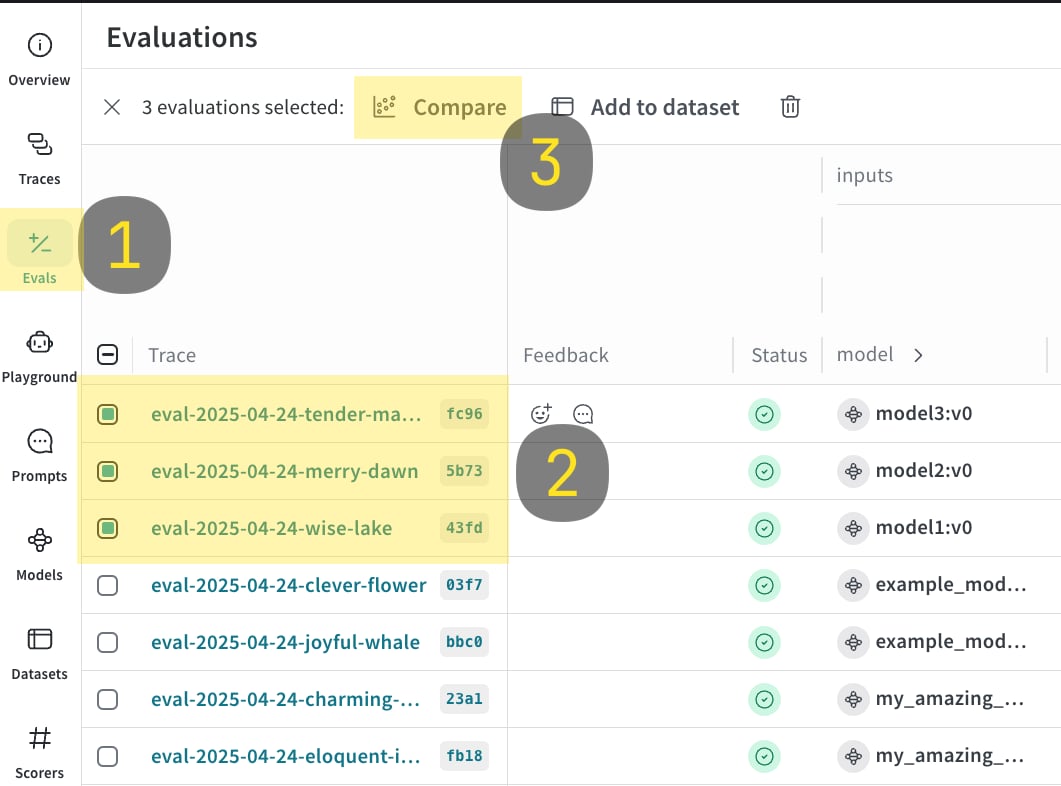
1. Run the code sample shown below.
2. In the Weave UI, navigate to the `Evals` tab.
3. Select the evals that you want to compare.
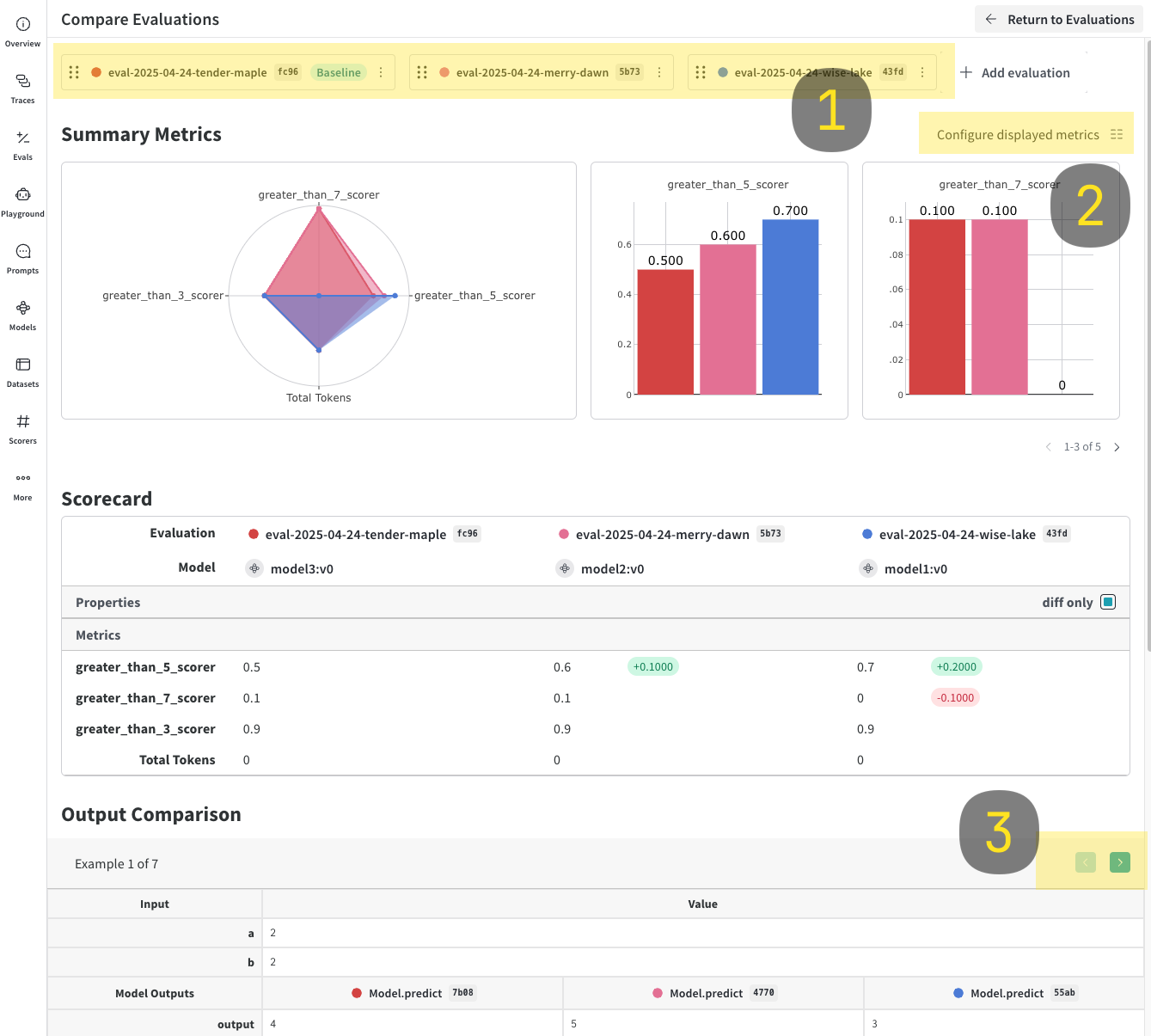
4. Click the **Compare** button. In the Compare view, you can:
* Choose which Evals to add or remove
* Choose which metrics to show or hide
* Page through specific examples to see how different models performed for the same input on a given dataset
For more information on comparisons, see [Comparisons](../tools/comparison)
```python lines theme={null}
import weave
models = [
"model1",
"model2",
{"name": "model3", "metadata": {"coolness": 9001}}
]
for model in models:
# EvalLogger must be initialized before model calls to capture tokens
ev = EvaluationLogger(
name="comparison-eval",
model=model,
dataset="example_dataset",
scorers=["greater_than_3_scorer", "greater_than_5_scorer", "greater_than_7_scorer"],
eval_attributes={"experiment_id": "exp_123"}
)
for inputs in your_dataset:
output = your_output_generator(**inputs)
pred = ev.log_prediction(inputs=inputs, output=output)
pred.log_score(scorer="greater_than_3_scorer", score=output > 3)
pred.log_score(scorer="greater_than_5_scorer", score=output > 5)
pred.log_score(scorer="greater_than_7_scorer", score=output > 7)
pred.finish()
ev.log_summary()
```
```typescript lines theme={null}
import weave from 'weave';
import {EvaluationLogger} from 'weave/evaluationLogger';
import {WeaveObject} from 'weave/weaveObject';
await weave.init('my-project');
const models = [
'model1',
'model2',
new WeaveObject({name: 'model3', metadata: {coolness: 9001}})
];
for (const model of models) {
// EvalLogger must be initialized before model calls to capture tokens
const ev = new EvaluationLogger({
name: 'comparison-eval',
model: model,
dataset: 'example_dataset',
description: 'Model comparison evaluation',
scorers: ['greater_than_3_scorer', 'greater_than_5_scorer', 'greater_than_7_scorer'],
attributes: {experiment_id: 'exp_123'}
});
for (const inputs of yourDataset) {
const output = await yourOutputGenerator(inputs);
// Fire-and-forget pattern for clean, efficient logging
const pred = ev.logPrediction(inputs, output);
pred.logScore('greater_than_3_scorer', output > 3);
pred.logScore('greater_than_5_scorer', output > 5);
pred.logScore('greater_than_7_scorer', output > 7);
pred.finish();
}
await ev.logSummary();
}
```
 ## Usage tips
* Call `finish()` promptly after each prediction.
* Use `log_summary` to capture metrics not tied to single predictions (e.g., overall latency).
* Rich media logging is great for qualitative analysis.
* **Auto-finish behavior**: While we recommend explicitly calling `finish()` on each prediction for clarity, `logSummary()` automatically finishes any unfinished predictions. However, once the script calls `finish()`, it cannot log anymore scores.
* **Configuration options**: Use configuration options, including `name`, `description`, `dataset`, `model`, `scorers`, and `attributes` to organize and filter your evaluations in the Weave UI.
## Usage tips
* Call `finish()` promptly after each prediction.
* Use `log_summary` to capture metrics not tied to single predictions (e.g., overall latency).
* Rich media logging is great for qualitative analysis.
* **Auto-finish behavior**: While we recommend explicitly calling `finish()` on each prediction for clarity, `logSummary()` automatically finishes any unfinished predictions. However, once the script calls `finish()`, it cannot log anymore scores.
* **Configuration options**: Use configuration options, including `name`, `description`, `dataset`, `model`, `scorers`, and `attributes` to organize and filter your evaluations in the Weave UI.